
What Changes When Tucson Website Design and SEO Come From One Person?
The decisions get made once. I design the site, write the copy and the schema, and handle the search work after launch, so the layout never has to be pulled apart to make the site rank.
I'm David Cragg, and SEO Tucson is a one-person practice. This page covers the Tucson website design I do for small businesses: how a site gets planned and built, what you own when it's finished, and why the person drawing the layout should also be the person writing the title tags. It's also what most people mean by website design for SEO, a site whose pages, structure and markup are decided with search in mind before anything gets drawn.
If you're comparing prices, that's on what SEO costs in Tucson. If you already have a site that ranks and you're thinking about replacing it, start with how to redesign a website without losing rankings. My background is on the about page. This page sticks to the build.
Where a point rests on published research or Google's documentation, the source is linked at the bottom. The build process and the client results come from my own work since 2007, and I've said so where it matters.
The short version
- I write the page HTML by hand. You get markup a person can read and audit a year from now, not the nested layers a page builder leaves behind.
- Design and search are one job here. The person choosing the layout is the person writing the headings, the title tags and the schema.
- Trust is something design produces. Stanford's credibility research and Nielsen Norman Group both found that how a site looks is one of the first things a stranger uses to decide whether to believe it.
- Every word is in the HTML the server sends. Search engines and AI crawlers get the whole page without having to run a script.
- Design is inside the monthly fee. $1,000 a month, month to month, with no contract and no separate build fee. You own the domain, the hosting and the site.
What Do You Get When One Person Builds the Whole Site?
Most small business website projects fail at a seam. The designer delivers something attractive and leaves. The SEO arrives later and finds the H1 is a slogan, the photos weigh two megabytes each and the contact page is an iframe. Nobody did anything wrong, exactly. Nobody owned the whole result either.
I keep my client list small so I can do all of it myself: the layout, the CSS, the structured data and every change after launch. When something needs to change, I change it. There's no ticket queue and no project manager translating what you said into something a developer will misread.
The copy is part of the same job. I write the pages from what you tell me about your work, your prices and the jobs you want more of, and you read every page before it goes up. How that writing gets researched is on the content creation page.
Which Design Decisions Decide Whether a Stranger Trusts You?
A first-time visitor isn't judging your craftsmanship. In a few seconds they're deciding whether you're a real business that will answer the phone, and they decide on surface signals. The research on this is old, and it hasn't changed much.
The Stanford Guidelines for Web Credibility found that people judge a site partly on its visual design, and that a site that looks neglected reads as less believable whatever it says. Nielsen Norman Group's work on trustworthiness lands in the same place and adds the practical part: up-front, current and complete information counts as much as how the page looks. A polished page with last year's date in the footer and a stock photo of a handshake loses to a plain page with a real photo and a real address.
So most of the design work is removing reasons to doubt you:
- Real photos of the real business. Your truck, your shop, your crew. Stock photos are the quickest way to look like a lead-generation site with no business behind it.
- Name, address and phone where people look for them. On every page, matching your Google Business Profile, not buried behind a contact form.
- Specific claims instead of adjectives. Years in business, the towns you serve, license numbers and the work you don't do.
- Type that adults can read. 18px body text, generous line spacing and real contrast. Most small business sites are set too small and too light.
- One obvious next step on each page. Call, or fill out a short form. Not both, six times, in three colors.
What Makes Website Design Work for SEO?
A site can look excellent and still be invisible. Most of what decides whether Google can use your pages is work a designer never touches, which is why I don't split the two jobs.
Google's documentation sets the terms. Page experience is about whether people can actually use the page: it loads quickly, nothing jumps around while it loads, and it works on a phone. Mobile-first indexing means the phone version is the one Google indexes, so anything cut from the mobile layout may never be seen. The structured data guidelines require markup to describe what's actually visible on the page, which rules out a plugin's generic defaults.
AI assistants add one more reason to build this way. In a December 2024 study by Vercel and MERJ, none of the major AI crawlers it tracked, including OpenAI's and Anthropic's, ran JavaScript. They read the HTML the server sends, so text that only appears after a script runs can be missing from what they see. A hand-coded page puts every word in that first response.
That's why every page I build ships with hand-written HTML, images sized and compressed before upload, one stylesheet loaded once, and JSON-LD that matches the visible text word for word. When I say a change is live, I've read the page source myself. The deeper checks, such as indexing, redirect chains and Core Web Vitals thresholds, are covered on technical SEO.
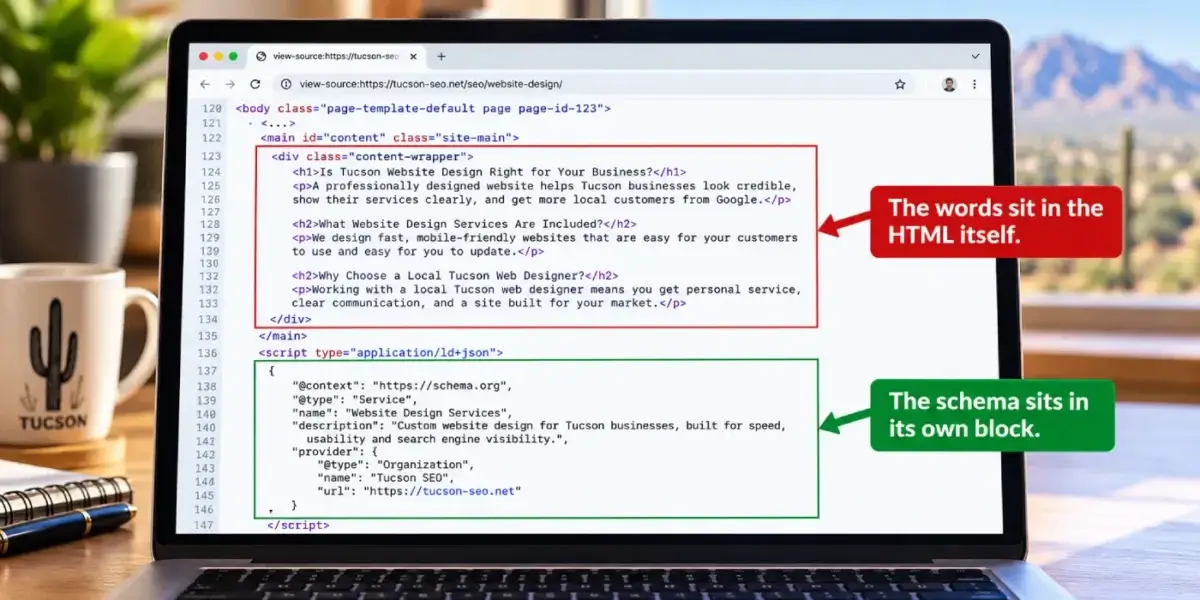
What a crawler receives from a hand-coded page: the words sit in the HTML itself, and the schema sits in its own block.
| The part that matters | Typical template or agency build | How I build it |
|---|---|---|
| Who writes the page | A designer, then a content writer, then maybe an SEO | One person who does all three |
| Page HTML | Generated by a builder, deeply nested, hard to audit | Hand-written, readable, one class system |
| Schema markup | A plugin's defaults, often contradicting the page | Written for each page, matched to the visible text |
| What AI crawlers see | Whatever survives without JavaScript | The whole page, in the first HTML response |
| Speed | Patched later with a caching plugin | Designed in: fewer requests, sized images |
| Changes after launch | Scoped, quoted and scheduled | Included in the monthly fee |
| What you own | Sometimes a license to a platform you can't leave | The domain, the hosting and the site |
How Does a Build Run From First Call to Launch?
- Read what you have. Current pages, current rankings, your Google Business Profile and where the existing site loses visitors. If you have analytics, I want it before I design anything.
- Decide the page set. One page for each thing a customer searches for, with a deliberate URL for each. This is where most small business sites go wrong, and it's a decision, not a template.
- Write the copy first. Layout follows content. Drawing boxes and then hunting for words to fill them is how a page ends up with three sentences about excellence.
- Build the pages. Hand-coded HTML on the site's own small design system, with the schema written alongside each page instead of added later.
- Map and redirect. Every retired URL gets a 301 to its closest replacement. Nothing is left to a plugin's guesswork.
- Check the live source. I read the rendered page source, check the markup and confirm every redirect resolves in one hop.
- Keep working on it. Launch is a starting point. Each month I keep editing, adding pages and fixing what the data shows.
Step five carries the most risk when the old site already ranks. How I build the redirect map, what I check on launch day and what to watch in Search Console afterward are all in redesigning a website without losing rankings.
Who Is This Website Design Service a Good Fit For?

I design and build every site myself, which is why the client list stays small.
It fits local service businesses that want their website and their search presence handled by one accountable person: home services, contractors, dental and medical practices, law firms and auto shops. It suits owners who can send real photos and straight answers, and who see the site as something that keeps improving after launch.
It doesn't fit large online stores with thousands of products, custom web applications, or a project that has to run on something other than WordPress. If that's what you need, I'll tell you on the first call.
Continuity is most of what you're buying. Leo Rich Severns, whose review is below, had been through nine web developers in seven years before I built his site in Southern California. The work only compounds if the same person is still there to keep it.
Because this is a one-person practice, you deal with me from the first call through every change after launch.
Want to Know What Your Current Site Is Costing You?
Send me the URL. I'll look at the live source, your Google Business Profile and the searches you show up for, then tell you straight whether you need a rebuild or a few fixes. There's no charge for the look.
Or call (520) 207-6000.
What Does Website Design Cost?
It's part of the monthly fee: $1,000 a month, month to month, with no contract. Design, the build, the copy, the schema, changes after launch and Google Business Profile management all sit inside that one number. There's no separate build fee and no add-on price for the profile. A Google Business Profile audit is free whether or not you hire me.
What sits outside the fee, and how the price compares with agencies, is on what SEO costs in Tucson.
What's Different About Website Design in Tucson?
The build is the same for every client. Three things about this market change the details. They come from building for businesses here, not from published research.
The page set follows the towns you serve. Distance counts in local results, and Oro Valley, Marana, Sahuarita, Vail and midtown behave like separate markets. If you work in several of them, the first sitemap plans a page for each town you actually serve, with real local detail on each one, instead of a single page that claims the whole metro.
Pages get read on a phone in bright sun. Plenty of your customers look you up from a truck or a parking lot at midday. That's why the type stays large, the contrast stays high and the phone number is a button that's easy to hit, instead of light gray text on white that washes out outdoors.
Part of the audience is older. Green Valley is largely a retirement community, and winter residents arrive across the metro from about October. Larger type, plain labels and a phone number in the header matter more to those customers than any animation does.
Where Does Design Fit With the Rest of the Work?
The site is where the rest of the search work lands, so each of these depends on how it's built.
What Does Technical SEO Add After the Build?
Crawling, indexing, redirects, schema and page speed, checked every month. A well-built site needs less of this work, but no site needs none.
Who Writes the Pages?
I do. Each page is written for one search and one reader, so nothing gets stretched to fill a layout.
Why Does the Site Have to Match Your Google Business Profile?
Your site and your profile have to tell the same story about who you are and where you work. Profile management is included in the monthly fee.
How Does the Site Help You Reach the Map Pack?
Service and town pages give Google a reason to show your profile for searches across your service area.
If you'd like a written diagnosis of your current site before deciding anything, start with an SEO audit. If reviews are what's holding you back, that's reputation management. Everything the monthly fee includes is listed on SEO services for $1,000 a month.
I work across Oro Valley, Marana, Catalina Foothills, Sahuarita, Green Valley and Vail, as well as Tucson and the rest of Southern Arizona.
What Do Clients Say About Working With David?
Four of the ten reviews on my Google profiles, quoted in full. Three were left on the Temecula SEO profile during the Southern California years, before the practice moved to Tucson in 2022. Bao Nguyen's appears on both the SEO Tucson and Temecula SEO profiles. Leo Rich Severns' review is about a website I built for his business.
David built and developed the website for my business. His customer service and expertise are superior to anyone else I had previously used. How many web development guys had I been through that promise the moon, work hard for a short while, then become difficult to get a hold of later? I'll tell you: there were 9 in 7 years! Temecula SEO worked with us closely, is VERY knowledgeable and computer savvy! It's so nice to have a custom website built; and, actually see it rank well on-line! If you want an SEO guy you can count on, David with Temecula SEO is your man!
Leo Rich Severns Master Technician, 5.0 Google review on the Temecula SEO profile
I have been a client of David at SEO Tucson for over 10 years. His wealth of knowledge of SEO marketing has been a tremendous help for my company. He's always up to date with all the new rules and changes and always willing to try new things to help push and keep my company on the top of Google listing
Bao Nguyen 5.0 Google review on the SEO Tucson and Temecula SEO profiles
Called to inquire about services. Dave was extremely helpful in providing knowledge and guidance for a small business getting started.
Lou Ramirez 5.0 Google review on the Temecula SEO profile
I made a decision to Hire David, with Temecula SEO about a year ago now, it has changed the presence of my company online greatly. I would highly recommend giving david a chance if you are looking for an honest SEO company.
Jordan Johnson 5.0 Google review on the Temecula SEO profile
What Do People Ask About Tucson Website Design?
What does "website design" mean when the same person is also doing the SEO?
It means the decisions get made once instead of twice. The page set, the URLs, the headings, the copy, the markup and the layout are chosen together, so the design never has to be undone to make the search work possible. In a typical project those are separate vendors with separate goals, and the SEO inherits whatever the designer left behind. Here the layout exists to serve the content, and the content exists to answer a real search.
Do you build on WordPress, and can I edit the site myself?
Yes to both. You get an admin login, and you can edit text, swap photos and publish posts without asking me. The page structure and markup are hand-coded, so for structural changes it's faster and safer to ask me, and that's included in the monthly fee. Nothing is locked to a proprietary platform you'd have to abandon the site to leave.
Will you use a template?
No. Each site gets its own small design system: one stylesheet, one set of classes, and page HTML written by hand against it. That's why the pages stay fast and why the markup can still be audited a year later. A theme demo is a useful way to show me what you like, and I'm happy to look at examples you send, but I don't ship someone else's layout with your logo dropped in.
How long does a website design project take?
A small site of five to ten pages usually takes a few weeks, and most of that time goes into content rather than code. The pace depends on how quickly I get the raw material: photos of the actual business, service details, pricing decisions and answers only you can give. Larger rebuilds with many existing URLs take longer, because the redirect mapping has to be careful. I'd rather launch a correct site late than a broken one on schedule.
Who owns the website, the domain and the hosting?
You do, all three, in your own accounts with your own logins. I work inside your accounts instead of keeping your site on mine. If you ever stop working with me, the site and the domain stay exactly where they are and keep working, and nothing has to be exported or rebuilt. That arrangement is deliberate, and I'd be wary of any designer who won't agree to it.
Does the design actually work on phones?
It has to, because the phone version is the one Google indexes. Every layout reflows instead of shrinking: type stays readable, tables turn into stacked cards, tap targets stay big enough to hit, and the content on the phone is the same content as on the desktop. Nothing important is hidden behind a mobile breakpoint. I test on real phones, not just a narrowed browser window.
How fast will the site be?
Fast enough that speed stops being a topic, which mostly comes from not doing the things that make sites slow. Images are sized and compressed before they're uploaded, there's one stylesheet instead of a stack of plugins, no web fonts nobody asked for, and no carousel loading three megabytes of photos. Caching helps at the margins, but it can't rescue a heavy page. The goal is a page that shows up right away and doesn't shift around while it loads.
Is the design accessible?
To a practical standard, yes. That means real text instead of text baked into images, contrast that holds up on a phone in daylight, visible focus outlines for keyboard users, headings in a logical order, alt text that describes each image, and form labels attached to their fields. It isn't a formal audit or a legal certification, and if you need conformance testing against a specific standard, that's a job for a specialist. Most accessible design is simply careful design.
Can AI assistants like ChatGPT and Claude read a site you build?
Yes, as long as your firewall lets their crawlers in. Most AI crawlers read the HTML a server sends without running JavaScript, so text that only appears after a script runs can be missing from what they see. On the sites I build, every word is in that first HTML response, including the FAQ answers and the business details. Some security settings block AI crawlers by default, so I check crawler access after launch as well.
Can you take over a WordPress site another designer built?
Yes, as long as you control the logins. I start by reading the live page source and the admin to see what the last builder left behind, such as a heavy page builder, plugin schema that contradicts the page, or a second set of title tags. Some sites only need their pages rewritten on the existing theme, and some need a new build. Either way, the work happens in your hosting account, not mine.
What happens after the site launches?
The monthly work continues, because launch is where the useful part starts. I keep editing copy, adding pages as new searches show up, fixing what the data says isn't working, and keeping the markup correct as the site grows. If you ever stop, you keep the site exactly as it is.
Where Does the Information on This Page Come From?
The design principles rest on published credibility research and Google's own documentation. The build process, the client results and the Tucson observations come from my own work, and the text says so. If a linked page disagrees with anything here, the linked page is the authority.
- Stanford Web Credibility Research: Stanford Guidelines for Web Credibility. Visual design as a credibility signal, and why a site should show the real organization behind it.
- Nielsen Norman Group: Trustworthiness in Web Design, 4 Credibility Factors. Design quality, up-front disclosure, current content and connection to the rest of the web.
- Google Search Central: Understanding page experience in Google Search results. What Google means by a page people can actually use.
- Google Search Central: Mobile-first indexing best practices. Why the phone layout is the version that gets indexed.
- Google Search Central: General structured data guidelines. The rule that markup has to match the visible page.
- Vercel: The rise of the AI crawler. The December 2024 data showing that the major AI crawlers it tracked did not run JavaScript.
Ready to Talk About a Site That Brings In Calls?
Tell me what you do, where your customers are and what bothers you about the site you have now. I'll pull it up while we talk and tell you what I'd change first. The first conversation is free, and there's nothing to sign.
Or call (520) 207-6000.
SEO Tucson, formerly Temecula SEO
Serving Tucson and Southern Arizona
Phone: (520) 207-6000
Consultant: David Cragg, in search since 1990
Written by David Cragg, Tucson SEO consultant, in search since 1990. I've built and optimized websites for local businesses since 2007, first as Temecula SEO in Southern California and since 2022 as SEO Tucson.
On how this site is written: I use AI tools to draft and to check my own work. AI does not supply the facts about your business, it does not invent sources, and nothing goes up here that I have not read first. If you find a claim on this site you can't verify, call me and I'll fix it or pull it.
Page last reviewed October 27, 2026 by David Cragg. Google's documentation changes from time to time; the linked pages are the authority if they disagree with this page.