
Keyword Cannibalization: Two of Your Pages Fighting Over One Search
When two of your pages go after the same search, Google has to choose between them. It doesn’t always choose the page you’d pick, and sometimes it can’t decide at all.
By David Cragg, SEO Tucson, in search marketing since 1990. Published .
Keyword cannibalization is an SEO term, not a Google term, and it isn’t a penalty. It’s what happens when a site grows one well-meant page at a time and nobody keeps track of which page is supposed to answer which search. This article covers how I find it in Search Console, how I decide which page owns the query and what I do to the other page. The examples come from my own site, where I found the same problems I find on client sites.
The short version
- Two of your pages on page one for the same search is usually fine. Two pages taking turns, with neither holding a position, is the problem.
- Search Console shows every page Google displayed for a query. You don’t need a paid tool to find this.
- Pick one page to own each search, based on intent first, then on which page makes money.
- Fix the other page by retargeting it, trimming it or merging it. A canonical tag is rarely the right tool.
- Point your own internal links at the page that owns the search, or your site keeps voting for the wrong one.
What cannibalization actually is
Keyword cannibalization is shorthand for two or more pages on one site going after the same search for the same reason. Google doesn’t penalize it. What happens is simpler than that: Google has to choose which of your pages to show, and it doesn’t always choose the one you would. Sometimes it can’t settle on either, and the two pages take turns, each holding a position for a week or two before the other one replaces it.
It isn’t about a word appearing on two pages. A Tucson plumber’s site will mention water heaters on the homepage, the water heater page, the repair page and half the blog. That’s normal. Cannibalization is about intent: two pages that would each be a reasonable answer to the same search, with neither one clearly the better answer.
Two of your pages showing up for one search isn’t automatically a problem, either. If your service page sits at position three and your how-to article sits at position six for the same query, you own two spots on page one, and I’d leave that alone. The trouble starts when the pages trade places, when the impressions for a query are split between them and neither gets a strong position, or when Google keeps sending people who want to hire someone to an article that doesn’t sell anything.
Finding it in Search Console

You don’t need a paid tool for this. Search Console already records which of your pages Google displayed for each search, and Google’s help page on common tasks in the Performance report describes the exact clicks. It’s the first place I look, and on most small business sites it’s the only place I need to look.
Here’s how I run it:
- Open the Performance report for Search results and set the date range to the last three months. A shorter range doesn’t give a small site enough data to show a pattern.
- Open the Queries tab and sort by impressions. Start with the searches that matter to the business: the service plus the town, the problem a customer would type in, and the business name.
- Click one query. That filters the whole report to that search, and Search Console switches to the Pages tab on its own. Every address listed there is a page Google showed for that query.
- Look for two or more pages with real impressions. One page with nearly all the impressions and a second with a handful is just Google testing. Two pages splitting them is worth a closer look.
- Turn it around. Clear the filter, open the Pages tab, click one of the two pages and read its queries. If the two pages share most of their top queries, they’re competing for more than one search.
- Check the chart over time. Keep the query filter, add a page filter for one page, note the average position line, then switch the page filter to the other page. Two lines that keep crossing each other are the clearest sign there is.
Two limits are worth knowing. Search Console leaves out rare queries to protect searchers’ privacy, so on a small local site you’ll only see the bigger searches. And the table you export from the browser holds one dimension at a time, so you can’t export every query and page pair in one file. If you want that full list, connect Search Console to Looker Studio or pull the data through the API. The regular expression filter Google added to the Performance report also helps here: one filter can match every query that contains a service word, or any of several town names. For most small business sites, though, clicking through the top twenty queries by hand takes half an hour and finds what matters.
Is it a real problem?
Not every pair needs fixing. This is how I read what Search Console shows:
| What Search Console shows | What it usually means | What I do |
|---|---|---|
| One page gets nearly all the impressions; a second appears now and then | Google tested both and settled on one | Nothing |
| Two pages hold two different spots on page one | Both are useful answers, often to slightly different needs | Nothing. That’s two listings. |
| The two pages swap positions every week or two | Google can’t tell which one is the answer | Pick an owner and fix the other page |
| Impressions split between two pages, neither in the top ten | The signals are spread across two weak pages | Pick an owner, often merge |
| An article shows for a hiring search while the service page doesn’t | The article looks like the better answer to Google | Strengthen the service page and link the article to it |
| The homepage and a town page trade places for a town search | The town page says little the homepage doesn’t | Give the town page details only it can carry |
Before deciding anything, search the query yourself in a private window. What Google puts on page one tells you what it thinks the searcher wants. If page one is all service pages from local companies, an article won’t win that search however good it is, and your service page should own it. If page one is all guides and explainers, a service page is the wrong tool, and the article should own it.
Deciding which page owns the query
Once I’m sure two pages are competing, I pick one page to own the search. I ask the same questions every time, in this order:
- Which intent is Google rewarding? Hiring searches belong to service pages. Learning searches belong to articles. Page one of the results settles ties.
- Which page makes money? If one page leads to calls and form fills and the other doesn’t, the one that converts gets the query whenever the intent allows it. My guide to website traffic analytics covers the conversion tracking that answers this.
- Which page already says it? The page whose address, title and main heading already match the search has a head start, and choosing it means no address has to change.
- Which page has the history? Links from other sites, age and steady past performance all count. The Links report in Search Console shows which of your pages other sites link to.
- Which page does Google prefer now? Sometimes Google’s choice is right and my plan was wrong. If the page Google keeps choosing really is the better answer, I let it have the query and change the plan.
Then I write the decision down. Every page on this site has a lane: one primary search it owns, a few secondary searches that share its intent, and a set of FAQ topics no other page on the site answers. Before I write a new page, I check the list. Most cannibalization isn’t anyone’s mistake. It builds up one reasonable page at a time when nobody is keeping track.
How I sorted out my own site
When I rebuilt this site as SEO Tucson, I went through it the same way I go through a client’s. Four of the pairs I found, and what each page owns now:
The traffic article and the audit page. My website traffic analytics article used to be titled and optimized around SEO audits. So was my SEO audit service page, the page that actually sells the service. The article’s address already said website traffic analytics, so in August I retargeted it to that search and left SEO audits to the service page. A month later, my own blog cards were still showing the article’s old title. The WordPress post title, the SEO title and the social sharing title are three separate fields, and I had changed only one of them. When you retarget a page, change every place its title lives.
The About page and the Why Us page. My About page was answering pricing and engagement questions and carried a full comparison of hiring me versus hiring an agency. That’s the job of my Why Us page, where people decide whether to hire me. I moved those questions and the comparison table there. The About page now owns my name and my background, a search nobody else can compete for.
The homepage FAQs. My homepage had three FAQs, and all three repeated questions my service pages already answered. I replaced them with questions only the homepage should answer, about choosing a consultant: how to vet one, what happens when a one-person practice is unavailable, and what you keep if you leave. I’ve come to believe that the same FAQ on two pages tends to hold both pages back rather than help either one.
The Google Business Profile guide. My Google Business Profile optimization guide had grown a long section on reviews, covering ground my separate articles on getting and handling reviews were written for. I cut it to a short paragraph that sends readers to those articles and swapped its review FAQs for questions about the profile itself.
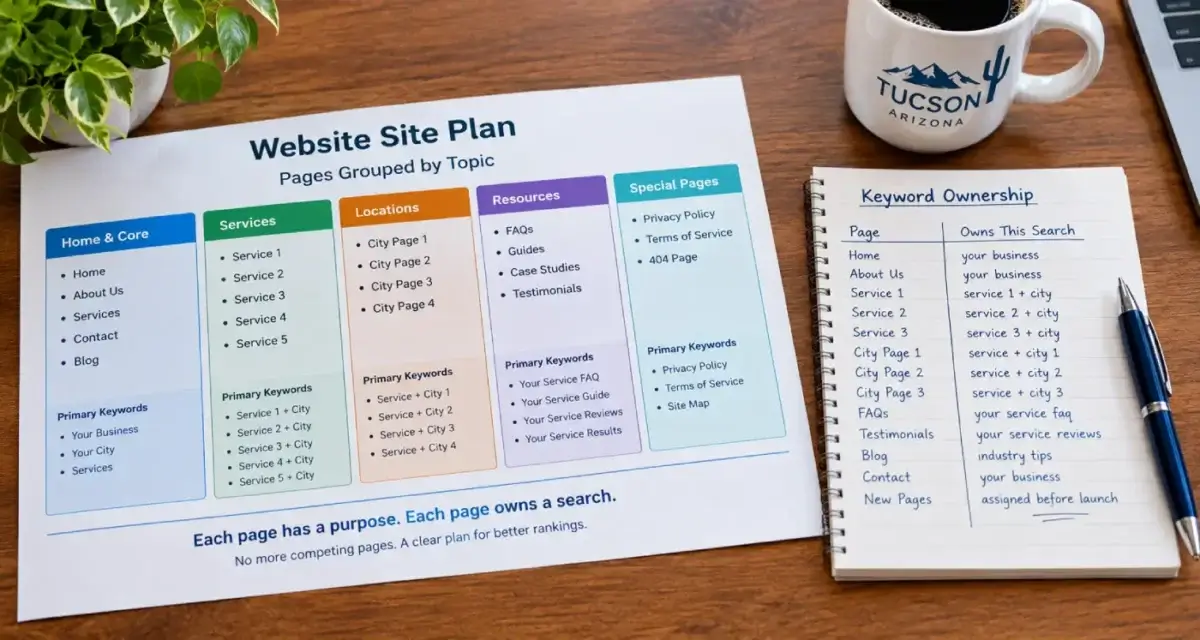
None of these were dramatic fixes. Each one was a decision about which page does which job, followed by edits that made the decision obvious to Google and to readers.
Fixing the page that doesn’t own it
The page that owns the search usually needs very little. The work goes into the other page, and there are five ways to handle it, from lightest to heaviest:
- Retarget it. Give the page a different search of its own, one it can actually win, and change its title, main heading and opening paragraph to match. This is what I did with the traffic analytics article. It’s the right fix when the page has value but was aimed at the wrong search.
- Trim it and hand off. When one section of a page duplicates the owner, cut that section to a short summary with a link to the owner. That’s the fix I used on the Google Business Profile guide.
- Merge it. When the weaker page has nothing the owner lacks, move anything worth keeping into the owner and send the old address to it with a 301 redirect. Whether to keep, merge or delete a page is its own decision with its own rules, and I cover it in Keep, Merge or Delete.
- Canonical tag. Rarely the right tool here. Google’s guide to consolidating duplicate URLs treats a canonical tag as a hint for pages that are duplicates or near-duplicates of each other. Two different pages on the same topic aren’t duplicates, and Google may ignore the hint.
- Noindex. Also rarely right. It takes the page out of search entirely, which throws away whatever the page earned. Noindex belongs on pages visitors need and searchers don’t.
Whichever you choose, fix your internal links next. Every link on your site that points at the losing page with the search phrase as its link text is telling Google that page is the answer. Point those links at the owner instead. Google’s link best practices explain that anchor text helps Google understand what a linked page is about, which works for you or against you. Then check your menus, your footer and any related-posts box your theme adds on its own.
When the fix involves redirects, canonical tags or a theme template that keeps creating duplicate pages, it crosses into the crawling and indexing work on my technical SEO services page.
Town pages and the homepage
On a local service site, the pair I’d check first usually isn’t two blog posts. It’s the homepage and a town page. A Tucson company with pages for Oro Valley, Marana and Sahuarita can end up with the homepage, the town page and a service page all showing for the same town search, each taking a turn.
To check, filter the Performance report to a town search, such as your service plus Marana, and see which pages appear. If the homepage keeps outranking the Marana page for Marana searches, the town page isn’t giving Google a reason to prefer it, and the fix is to make it unmistakably about that town. This site has town pages for Oro Valley and Marana, and I check those pairs the same way. What belongs on a town page so it isn’t a thin copy of the others is a bigger subject for a separate article.

After the fix
Request indexing for both pages in the URL Inspection tool so Google recrawls them sooner, then give it time. Google has to recrawl both pages, and the pages that link to them, before the change settles, and on a small site that usually takes several weeks. Come back to the query filter every couple of weeks, not every day.
If Google keeps showing the other page, go back through three things: internal links that still point at the wrong page, a title or heading on the losing page that still matches the search, and whether the owner really is the better answer. Sometimes the honest finding is that the page you wanted to win needs more work. Sorting out which pages own which searches is one of the checks in every SEO audit I run, because it costs less to fix than almost anything else on the list.
Not sure which of your pages owns what?
Give me read access to your Search Console. I’ll pull the searches where two of your pages are splitting the impressions and tell you which page should own each one, and what to do with the other. I answer my own phone.
What clients say
These are reviews clients left on my Google profiles. Most date from my Temecula SEO years in Southern California, before I moved to Tucson in 2022.
David at TemeculaSEO is a unique professional. He has been in the industry almost longer than the web has been around. He cares about my success and spends as much time as it takes to make my business succeed. I wish that I could afford to pay him more.
Dave does much more than “just” SEO, or at least he does everything even tangentially related to SEO. Not just finding keywords and maximizing them, but rather looking at things at their foundation so we get the best possible results. Dave is very hands-on and blazingly fast with execution. I’m sure I’ve tried his patience as I know just enough to be annoying and not near enough to do a good job of this myself. He manages to explain what I need explained in a “for dummies” level but without making me feel like an idiot.
With a lot of people our company works with, we are ready for their services/delivery/etc. before they are. This is especially true of some of our previous marketing efforts. We try not to get too impatient. With Dave on the other hand, we can’t keep up. And our results have improved dramatically very quickly!
Called to inquire about services. Dave was extremely helpful in providing knowledge and guidance for a small business getting started.
David is great to work with. He takes his job seriously, is a wealth of knowledge not only in SEO, but also business in general. If you are looking to for someone to handle SEO for you - you can stop looking now.
Questions about keyword cannibalization
Is keyword cannibalization a Google penalty?
No. Google doesn’t penalize a site for having two pages on the same topic, and it doesn’t use the term at all. The cost is indirect: Google has to choose between your pages, the signals that could have gone to one strong page get split between two, and the page it picks may not be the one that brings in customers.
Is it bad if two of my pages show up on page one for the same search?
Usually not. Two listings on page one take up more of the results and give searchers two ways in. It becomes a problem when the two pages trade places week to week, when neither reaches page one, or when the page Google prefers is one that doesn’t lead to calls or bookings.
Can a blog post and a service page target the same keyword?
They can share a topic, but they shouldn’t share a primary search. Give the service page the search people use when they’re ready to hire, and give the post a question people ask while they’re still learning. Then link the post to the service page so readers who are ready have somewhere to go.
How many keywords should one page target?
One primary search, plus close variations and related searches that share the same intent. If two searches need different answers, they need two pages. If they need the same answer, they belong on one page, and building a second page for the variation is how cannibalization starts.
Should I use a canonical tag to fix keyword cannibalization?
Rarely. Google treats a canonical tag as a hint, and it’s meant for pages that are duplicates or near-duplicates of each other. Two different pages about the same topic aren’t duplicates, so Google may ignore the tag. Retargeting, trimming or merging the weaker page usually works better.
Should I just delete one of the competing pages?
Not without checking what it has earned first. If the weaker page has links from other sites, traffic of its own or content the stronger page lacks, deleting it throws that away. Retarget it to a different search, or move its useful parts into the stronger page and redirect it there with a 301.
How long does it take Google to settle on the right page after a fix?
Usually several weeks. Google has to recrawl both pages and the pages that link to them before the change shows up. Requesting indexing in the URL Inspection tool can speed up the recrawl. Check the query in the Performance report every couple of weeks rather than every day.
Can a town page compete with my homepage?
Yes, when the town page says little that the homepage doesn’t. Google then has two similar answers for a search like your service plus the town name, and it may alternate between them. Give each town page details only it can carry, such as the neighborhoods and local conditions in that town.
Do internal links affect which page Google shows?
They’re one of the signals Google uses to understand what a page is about. If your own pages link to the weaker page using the search phrase as the link text, you’re telling Google that page is the answer. Point those links at the page you want to own the search.
Why does Search Console show a different page than the one I see when I search?
Search results depend on the searcher’s location, device and history, so your own search is one sample out of many. Search Console adds up what everyone saw. If it lists two pages for a query, both were shown to someone, even if you only ever see one of them.
More on SEO audits
Keep, Merge or Delete: What to Do With Old Pages
Old pages aren’t a problem because they’re old.
Do You Need to Disavow Toxic Links?
SEO tools love to flag toxic links, and some agencies sell monthly cleanups built on that score.
SEO audit services
How I audit a small business site: what I check, what you get at the end and the order the fixes go in.
Technical SEO services
What I check and fix on client sites: crawling, indexing, speed, schema and the plumbing underneath.
Website Traffic Analytics: How to Read Your Own Numbers
The five numbers I check first in GA4 and Search Console, and the decision each one leads to.
SEO Tucson, David Cragg
Tucson, Arizona. Serving Tucson, Oro Valley, Marana, Catalina Foothills, Sahuarita, Green Valley, Vail and the rest of Southern Arizona.
Written by David Cragg. Published October 24, 2026. Last reviewed October 24, 2026. Drafted with AI assistance, then edited, fact-checked and approved by David before publication. How I use AI, and what it is never allowed to do.