
Do You Need to Disavow Toxic Links?
Almost certainly not. Google says most sites will never need its disavow tool, and the toxic link scores that send people looking for it don’t come from Google.
By David Cragg, SEO Tucson, in search marketing since 1990. Published .
If you’ve run your site through an SEO tool, you may have seen a backlink report with a red number on it: a toxicity score, a spam score, a list of links marked dangerous. Some agencies sell monthly cleanups on the strength of that number, promising to disavow toxic links before they hurt you. Link review is part of every audit I run, and most of the time it ends with the same advice: leave the links alone. This article explains where that advice comes from, the narrow cases where a disavow file is the right call and how to build one properly if you’re in one of them.
The short version
- Toxic is a word from SEO tools, not from Google. Google’s disavow help page never uses it.
- Google ignores most spammy links on its own. Since December 2022, its SpamBrain system neutralizes unnatural links instead of counting them.
- Google says to disavow only when you have a considerable number of spammy or artificial links and they’ve caused, or likely will cause, a manual action.
- A manual action shows up in Search Console. If the Manual actions report says no issues detected, you don’t have one.
- A disavow file can only remove credit. Used on good links, it can hurt.
Where the word toxic comes from
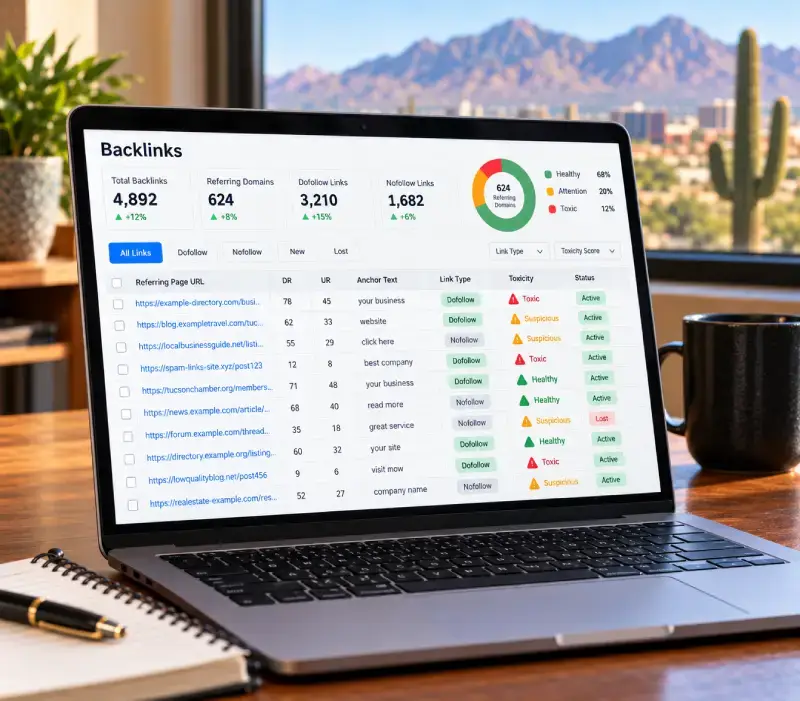
Toxic isn’t Google’s word. It comes from SEO tools that score every link pointing at your site and flag the ones that look spammy by their own measures. Google’s help page on disavowing links doesn’t use it once. Google’s John Mueller has been blunt about the reports built on it, calling disavow work driven by toxic link scores a billable waste of time.
Every site collects odd links over time. Scraper sites copy your pages and link back by accident. Website statistics sites list every domain they can find. Foreign directories add you without asking. Almost every site I audit has them, mine included. Those links are why a toxicity score is never zero, and they’re also the links Google is best at ignoring.
The score is a tool’s estimate. It can’t know whether anyone paid for a link, and that’s the question that matters most.
What Google does with spammy links now
The fear of bad links dates to 2012. Google’s Penguin update that year demoted whole sites for manipulative links, and Google released the disavow tool a few months later so site owners could clean up. I was running Temecula SEO in Southern California at the time, and most of today’s disavow habits were formed in that era.
Google’s approach has changed twice since. In 2016, Penguin became part of Google’s core algorithm and started devaluing spammy links instead of demoting the whole site. Then in December 2022, Google’s link spam update put SpamBrain, its machine learning spam system, to work neutralizing unnatural links. The announcement said rankings may change as those links lose whatever credit they had been passing. A link Google already ignores doesn’t become more ignored because you listed it in a file.
Bing went further and retired its own disavow tool in 2023. Google’s is still available, and in September 2026 Mueller said the tool does have effects, but only in the right situation. He added that disavowing a handful of links isn’t going to make a site drop out of search.
When a disavow file is the right call
Google’s help page sets two conditions, and both have to be true. You have a considerable number of spammy, artificial or low-quality links pointing at your site. And those links have caused a manual action, or likely will. Google adds that in most cases it can work out which links to trust without help, so most sites will never need the tool.
In practice, that comes down to three situations:
- You have a manual action for unnatural links. It appears in Search Console’s Manual actions report, and Search Console sends a message about it. A disavow file is part of the cleanup, along with removing every link you can.
- Someone bought links for your site. You, a former employee or an SEO company you hired paid for links, joined a link network or traded links at scale. Google’s spam policies name these as link schemes. Even without a manual action yet, these are the links Google describes as likely to cause one. If you can’t get them taken down, disavow them.
- A large, ongoing flood you can’t stop worrying about. Thousands of spam links arriving month after month. Google says it works hard to keep other people’s actions from hurting your site, and usually it succeeds. Mueller has also said that if you’re conflicted and want to be sure, using a disavow file is fine.
None of these is on the list: a high toxicity score, a ranking drop that lines up with a Google update, links from sites in other countries, links from scraper and statistics sites, nofollow links, or a competitor with more links than you.
Local links that look odd but are fine
For a Tucson business, many of the best links look nothing like what an SEO tool expects. A chamber of commerce member directory. A supplier’s dealer locator. A youth sports league’s sponsor page. A neighborhood association newsletter, a mention in the Arizona Daily Star, a listing on a trade association’s member page. Some of these come with low authority scores and plain pages. They’re real links from real local organizations, and they’re exactly the kind of links that tell Google where you work. Disavowing them because a tool marked them low quality throws away your best local signals.
The links that worry me look different. Dozens of unrelated sites, often blogs that write about everything, all linking with the same commercial phrase, such as a service followed by the word Tucson. Directory networks that sold a package of hundreds of submissions. Articles on sites that publish anything for a fee. What they have in common is that somebody paid for them.
How I review links in an audit
Link review is part of every audit I run, and it rarely ends with a disavow file. This is the order I work in:
- Manual actions first. In Search Console, open Security and Manual Actions, then Manual actions. If it says no issues detected, there’s no manual action, and most of the disavow question is already answered.
- The Links report. Search Console lists your top linking sites, your top linked pages and your top linking text. The linking text, also called anchor text, is where paid links usually give themselves away: a commercial phrase repeated across sites that have nothing to do with your trade.
- A conversation. I ask the owner whether anyone ever bought links, joined a link network or paid for a link package. That answer tells me more than any score.
- Patterns, not single links. One strange link means nothing. Forty sites using the same anchor text, or a few hundred links that all appeared in the same month, means something.
- Links to pages you never made. Spam links pointing at addresses that never existed on your site can mean the site was hacked and spam pages were added to it. That’s a security and technical problem first, and cleaning it up falls under my technical SEO services.
- An old disavow file. If a previous agency uploaded one, I open the disavow tool and read what’s in it. A file that disavows the business’s own chamber listing or its suppliers is quietly throwing away good links, and taking those lines out is one of the few disavow changes that can actually help.
| What you find | What it usually means | What I do |
|---|---|---|
| A scraper site that copied one of your pages | Automated, and ignored by Google | Nothing |
| A website statistics or domain value site | Automated, and ignored by Google | Nothing |
| A foreign directory you never joined | Automated, and usually ignored | Nothing |
| A chamber, supplier, sponsor or local news link | A real local link | Keep it, and earn more like it |
| Many unrelated blogs using the same commercial anchor text | Likely paid links or a link network | Find out who built them, ask for removal, disavow what’s left |
| Links pointing at spam pages on your own domain | Possible hack | Clean up the site first, then review the links |
If you do need to disavow
If you’re in one of the three situations above, do it carefully. These steps follow Google’s help page:
- Remove what you can first. Ask the sites to take the links down, and ask the vendor who placed them. Keep a record of every request. If you have a manual action, Google will want to see that effort in your reconsideration request.
- Use a URL-prefix property. The disavow tool doesn’t support Domain properties. If you verified your site in Search Console as a Domain property, which is how I usually set clients up, add a URL-prefix property for the version of your address the site actually uses, and upload the file there.
- Build one text file. One URL or one domain per line, saved as a .txt file in UTF-8. Use the domain: prefix to disavow a whole site, which is usually right for link networks. Lines that start with # are comments, so note why each entry is there. The file can hold up to 100,000 lines and 2MB.
- Upload the whole list every time. Each property gets one list, and a new upload replaces the old one. Add new entries to your existing file and upload all of it, never just the additions.
- Wait, then ask. Google says the file can take a few weeks to process as it recrawls the web. Disavowed links still appear in the Links report afterward, so don’t read that as a sign the file failed. If you had a manual action, submit a reconsideration request from the Manual actions report explaining what you removed, what you disavowed and what you changed.
A file looks like this, with a comment for each group of entries:
# Paid links placed by a former vendor in 2019. Removal requests sent, no reply.
domain:link-network-one.example
domain:link-network-two.example
# One paid article. Site owner declined to remove it.
https://general-news-blog.example/best-plumbers-in-tucson/
What a disavow file can’t do
A disavow file only subtracts. It tells Google to ignore links, and it never adds credit, so on its own it won’t raise your rankings unless the links it removes were behind a manual action. Used on good links, it can hurt, and Google’s help page says so plainly: used incorrectly, the tool can harm your site’s performance in search.
If your traffic fell and someone’s first answer is a disavow file, ask what else they checked. Traffic drops have a short list of causes, and spam links pointing at your site are rarely the one. Working out which cause it was is part of my SEO audit. The links that move rankings for a Tucson business are the ones it earns from customers, suppliers and local organizations that know it, and earning more of those is a better use of the money than any monthly cleanup.

Worried about your links?
Before you pay anyone to clean up links, let me look. I’ll check your Manual actions report and your Links report and tell you whether a disavow file would do anything for you. Most of the time it wouldn’t. I answer my own phone.
What clients say
These are reviews clients left on my Google profiles. Most date from my Temecula SEO years in Southern California, before I moved to Tucson in 2022. Dr. Nguyen is still a client today, and that review also appears on my SEO Tucson profile.
David built and developed the website for my business. His customer service and expertise are superior to anyone else I had previously used. How many web development guys had I been through that promise the moon, work hard for a short while, then become difficult to get a hold of later? I’ll tell you: there were 9 in 7 years! Temecula SEO worked with us closely, is VERY knowledgeable and computer savvy! It’s so nice to have a custom website built; and, actually see it rank well on-line! If you want an SEO guy you can count on, David with Temecula SEO is your man!
I have been a client of David at SEO Tucson for over 10 years. His wealth of knowledge of SEO marketing has been a tremendous help for my company. He’s always up to date with all the new rules and changes and always willing to try new things to help push and keep my company on the top of Google listing
Dave does much more than “just” SEO, or at least he does everything even tangentially related to SEO. Not just finding keywords and maximizing them, but rather looking at things at their foundation so we get the best possible results. Dave is very hands-on and blazingly fast with execution. I’m sure I’ve tried his patience as I know just enough to be annoying and not near enough to do a good job of this myself. He manages to explain what I need explained in a “for dummies” level but without making me feel like an idiot.
With a lot of people our company works with, we are ready for their services/delivery/etc. before they are. This is especially true of some of our previous marketing efforts. We try not to get too impatient. With Dave on the other hand, we can’t keep up. And our results have improved dramatically very quickly!
We have worked with David for over a year now and he is great to work with. David has built us a great new website that we love and our Google ranking has improved significantly. David is a great guy and works day and night to help you. I highly recommend Temecula seo. Thank you David for your hard work.
Questions about disavowing links
What are toxic backlinks?
It’s a label SEO tools give to links their own scoring considers spammy or risky. Google doesn’t use the term, and its disavow help page never mentions it. A toxicity score is a tool’s estimate, not a measurement of how Google sees your links.
Can bad backlinks hurt my rankings?
Rarely. Google says it can usually work out which links to trust, and its spam systems neutralize unnatural links rather than counting them. The real risk is links someone paid for or built through a link scheme, which can lead to a manual action against your site.
How do I know if I have a manual action for unnatural links?
Open Search Console, go to Security and Manual Actions, then Manual actions. A manual action is listed there with a description of the problem, and Search Console also sends a message to the site’s owners. If the report says no issues detected, you don’t have one.
Should I disavow spammy links from foreign or scraper websites?
Usually not. Scraper sites, statistics sites and foreign directories link to almost every site on the internet, and Google ignores them. Disavowing them takes time and changes nothing. Save the disavow file for links someone paid for or built on purpose.
Can a competitor hurt my site by pointing spam links at it?
It’s possible in theory and rare in practice. Google says it works hard to make sure actions on other sites don’t hurt yours, and its systems are built to ignore that kind of spam. If you’re seeing a large, sustained flood and it worries you, Google’s John Mueller has said using a disavow file to be sure is fine.
Will disavowing links improve my rankings?
Not on its own. A disavow file only tells Google to ignore links, so it can remove credit but never add any. It helps when the disavowed links caused a manual action. Used on good links, it can lower your rankings instead.
How long does a disavow file take to work?
Google says it can take a few weeks, because the file is applied as Google recrawls the pages that link to you. Disavowed links still appear in the Links report afterward, so their presence there isn’t a sign the file failed.
Can I undo a disavow file?
Yes. Upload a new list without the entries you want back, or use Cancel Disavowals in the tool to remove the whole list for that property. Either change also takes a few weeks to take effect as Google recrawls.
Why can’t I use the disavow tool with my Domain property?
Google’s disavow tool doesn’t support Domain properties. Add a URL-prefix property in Search Console for the version of your address the site actually uses, such as the https version with or without www, and upload the list there.
Do I need a monthly link cleanup or disavow service?
Almost never. Unless you have a manual action or know links were bought for your site, a monthly disavow service means paying someone to manage links Google already ignores. That money does more good earning real links from local organizations, suppliers and press.
More on SEO audits
Keyword Cannibalization: Two of Your Pages Fighting Over One Search
When two of your pages chase the same search, Google has to pick one, and it doesn’t always pick the page that brings in customers.
Keep, Merge or Delete: What to Do With Old Pages
Old pages aren’t a problem because they’re old.
SEO audit services
How I audit a small business site: what I check, what you get at the end and the order the fixes go in.
Technical SEO services
What I check and fix on client sites: crawling, indexing, speed, schema and the plumbing underneath.
Website Traffic Analytics: How to Read Your Own Numbers
The five numbers I check first in GA4 and Search Console, and the decision each one leads to.
SEO Tucson, David Cragg
Tucson, Arizona. Serving Tucson, Oro Valley, Marana, Catalina Foothills, Sahuarita, Green Valley, Vail and the rest of Southern Arizona.
Written by David Cragg. Published October 24, 2026. Last reviewed October 24, 2026. Drafted with AI assistance, then edited, fact-checked and approved by David before publication. How I use AI, and what it is never allowed to do.