Verification When It Fails
The video is the part people get wrong, and it is the only part where a sixty-second mistake costs you a week of invisibility.
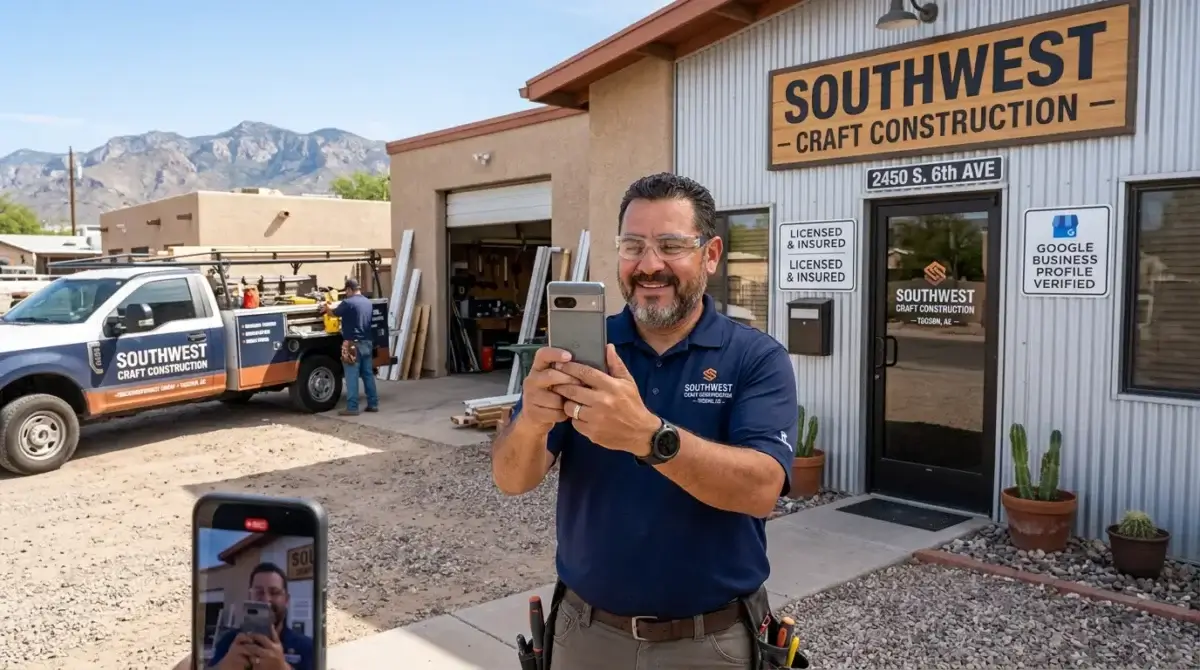
I'm David Cragg. I've been doing search marketing since 1990, and I've stood in parking lots in Marana, Sahuarita and the Catalina Foothills coaching business owners through this on speakerphone while they walked backward toward their own front door. Video verification is not hard. It is unforgiving. Those are different problems, and almost everything written about it treats them as the same one.
This page is about the failure side. What to film and in what order, yes — but mostly what actually gets recordings rejected, what to do when Google sends you back for a second attempt with a vague reason attached, and the worst case, which is Google offering you no verification method at all and no explanation for why.
Where Google's own documentation states something plainly, I've said so and linked it at the bottom. Where I'm telling you something I learned by doing it wrong, I've labeled that too. The two are not equally reliable and you deserve to know which is which.
The short version
- You cannot film it in advance. Google's requirements say the footage has to be captured live, inside the Business Profile flow, on a mobile device. A polished clip shot yesterday on a real camera is not eligible, no matter how good it is.
- One take, no cuts, minimum thirty seconds. Google publishes a floor. It does not publish a ceiling on that page — the widely repeated "five minute maximum" is folklore, not a documented rule.
- Three proofs, not one: where you are, that the business exists, and that you personally have access to it. Most rejections are a missing third proof, not bad footage.
- The name on the sign has to match the name on the profile. Not approximately. This is the single most common failure I see.
- On a second attempt, re-film everything. Google asks for all the info from the first video plus the missing pieces. People film only the gap and fail twice.
- No verification method offered usually means an address problem, not a video problem. A better video will not fix an ineligible address.
What Google Is Actually Checking
Stop thinking of it as a video and start thinking of it as three separate claims you are being asked to evidence in a single unbroken shot. Google's help documentation lays them out in exactly this structure, and every rejection notice I've ever read maps back to one of the three.
One: location. Are you standing where the map pin says you are? Street signs, building numbers, neighboring businesses, recognizable landmarks. Google explicitly tells service-area businesses to avoid filming empty land or locations without clear markers — which, in Southern Arizona, is advice with teeth. A wall, a gate and creosote could be almost anywhere between Three Points and Benson.
Two: the business exists. For a storefront that means permanent signage carrying the business name — a signboard, a wall, a window. For a service-area business it means the working apparatus: tools, equipment, machinery, your workspace, business cards, branded apparel.
Three: you manage it. This is the one people skip, and it is the one that sinks them. Google wants to see you do something only an authorized person could do. Unlock the door. Open the register. Log into the point-of-sale. Unlock a van with your branding on it. Perform the service. It is a proof of access, not a proof of existence, and filming a beautiful storefront from the sidewalk demonstrates nothing about who you are.
Hold those three in your head and the rest of this page is just execution.
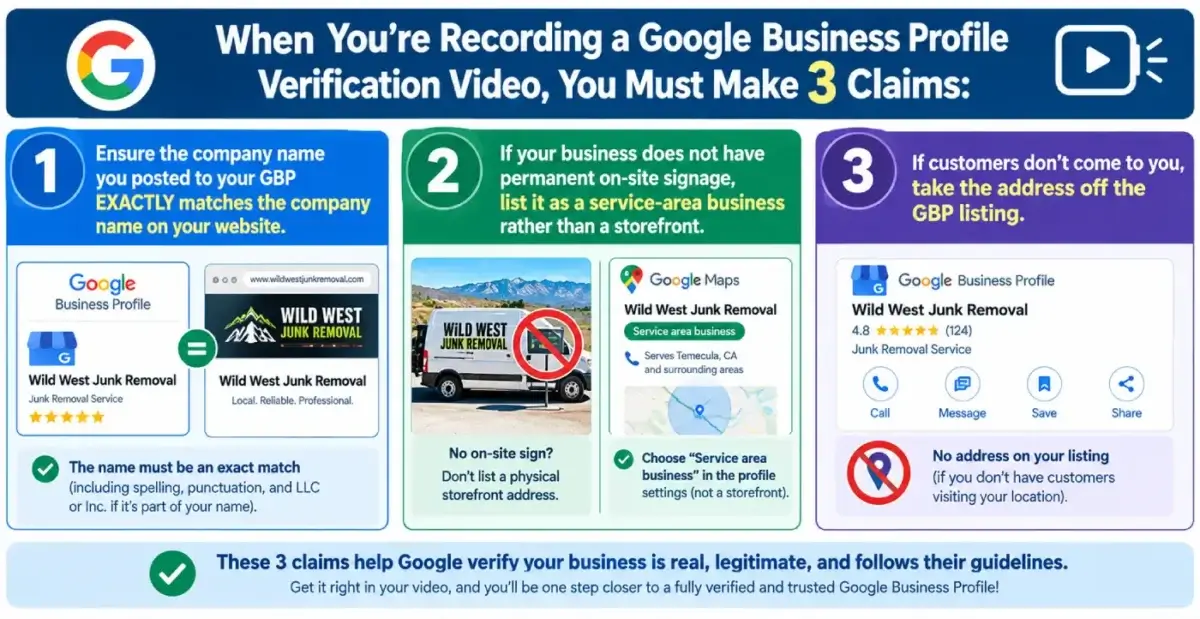
Three claims, one unbroken take. A rejection is almost always a missing claim rather than bad camera work.
Before You Press Record
The pre-flight matters more than the filming. I run this list with clients before anybody touches a phone, and it takes about ten minutes.
- Sign in as the right account. Use the Google account that owns or manages the profile. If you're not sure which account that is, sort that out first — I've written a full walkthrough on recovering a profile somebody else controls, and there is no point filming for an account that can't receive the result.
- Read your profile name out loud, then read your sign. If the profile says "Sonoran Ridge Plumbing & Drain" and the truck says "Sonoran Ridge Plumbing," you have a mismatch. Fix the profile before you film, not after you're rejected.
- Decide honestly whether you're a storefront. Google is direct about this: if your business does not have permanent on-site signage, list it as a service-area business rather than a storefront. Half the failed verifications I get called about are a home-based trade trying to pass as a storefront.
- If customers don't come to you, take the address off the listing. Google's guidance says service-area businesses should not add a business address to the profile. Filming a residential driveway to justify a published street address is a fight you will lose twice.
- Charge the phone and clear the storage. Uploads fail. Google's own FAQ tells you to simply try the upload again, which is honest but unhelpful at nine percent battery in a gravel lot.
- Walk the route once with the camera off. Know where you're starting, what you're pointing at, and where you end. You get one take.
- Pick a quiet hour. Not because Google requires silence, but because you are told not to capture other people's faces, and an empty parking lot is easier to film than a busy one.
What to Film, in Order — Storefront and Hybrid
A storefront serves customers in person at a physical location with permanent signage. A hybrid does that and also goes out to customers — a dine-in restaurant that delivers, a shop that does service calls. Same filming requirements.
Start outside, on the public side, and work inward. The sequence matters because it tells a story a reviewer can follow in one pass.
- The street sign and the block. Start wide. Get the cross street placard if there is one, then pan to the building. If there's a recognizable neighbor — the shopping center's name, the business next door — hold on it for a beat.
- The building number. Suite numbers especially. In a multi-tenant office off Oracle or Broadway, the suite number is doing most of the work of proving you are where you say you are.
- Your permanent sign, slowly. Monument sign, storefront band, window lettering, door vinyl. Steady, close enough to read, and long enough that a reviewer can compare it word for word against your profile name.
- The approach to the entrance. Keep walking. Do not cut.
- Unlocking the door with your keys. This is your first management proof and it is cheap to get. Film your hand, the key, the lock, the door opening.
- The interior, wide. Reception, sales floor, showroom, treatment rooms, shop bays. Show that it is a functioning space rather than a room with a desk in it.
- A second management proof. Open the register. Log into the POS. Walk into the stockroom or the staff-only area. Open the kitchen. Something a customer could not do.
- Branded material on site. Menus, price boards, letterhead, embroidered shirts on a rack, work orders with the business name — hold the camera still and let it focus.
Sixty to ninety seconds covers all eight comfortably at a walking pace.

For most Tucson trades, the truck is the sign. Unlocking it on camera is the strongest management proof you own.
What to Film, in Order — Service-Area Businesses
This is most of my client base and most of the failures. A service-area business goes to the customer and does not serve them at its own address. Plumbers, electricians, HVAC techs, haulers, pool service, garage door companies, mobile notaries, landscapers. If that's you, the whole exercise is different, because the thing you're proving is not "there is a shop here" but "there is a real operation here and I run it."
- The street sign or the nearest real marker. Google explicitly permits a home-based service-area business to record landmarks and signs in the immediate neighborhood to confirm the address. Use that permission. Corner street blades, the subdivision monument, a numbered utility box, the visible house number.
- Something that fixes you in a specific place. This is where Southern Arizona owners get careless. A block wall against desert scrub reads as nowhere. A named subdivision entrance, a mailbox cluster with numbers, a school or church sign a mile from the house — those read as somewhere.
- The vehicle, whole. Walk the length of it. Door lettering, phone number, wrap, DOT or ROC number if you carry one.
- Unlock the vehicle on camera. Google names this one directly — unlocking a van with your business branding on it is proof of management. Keys or fob, then open the doors.
- The inside of the vehicle, and the tools. Racked pipe, a machine, a spool, a camera reel, a jetter, testing equipment. Whatever your trade actually carries. Specialized equipment is far more persuasive than a generic toolbox.
- Branded apparel or printed material. Embroidered shirts, magnetic signs, business cards, an invoice pad. Hold each one still.
- The workspace. Garage bay, shop, yard, or the desk where you actually run the business. A home office counts. You do not need to walk Google through your living room.
- A document, held steady. Google lists a business permit, an invoice or a utility bill matching the name on your profile. Frame it, hold it four or five seconds, let the phone focus. Cover anything sensitive with your thumb first — account numbers, tax identifiers, personal identification are all explicitly off limits.
If you can safely film yourself performing the service — pulling a line, setting a unit, loading a truck — do it. It is the strongest single piece of footage available to a service business and almost nobody bothers.
| Requirement | Storefront or hybrid | Service-area business |
|---|---|---|
| Where to start | Street sign, block, building number | Street sign or neighborhood landmark near the address |
| Proof the business exists | Permanent signage with the exact profile name | Tools, equipment, branded vehicle, workspace, apparel |
| Proof of management | Unlock the door, open the register, use the POS, enter staff-only areas | Unlock the branded van, perform the service, show a permit or invoice |
| Address on the profile | Shown — customers are served there | Hidden — Google says not to add it |
| Most common failure | Sign name doesn't match profile name | Location too generic to identify |
| Hardest part | Remembering the management proof | Proving a specific address without a sign |
Why Recordings Get Rejected
Google tells you the video didn't meet the requirements and lists issues under Review issues in your profile. The examples Google publishes are telling: business name not visible on the storefront, no nearby area shown, missing proof of authorization to operate the business. Those are the three proofs again, failing one at a time.
Here is the fuller list, ordered by how often I see each one. The first six are the documented requirements. The rest are practitioner observations from my own work, and I'd rather label them that way than dress them up as rules.
Documented requirement failures
- The recording was edited, broken or reused. Google requires an unedited, unique, complete recording with no breaks. Pausing counts as a break. So does stopping and restarting because you forgot something.
- Under thirty seconds. A short clip that technically shows all three proofs still fails the published minimum.
- Filmed outside the flow. Pre-recorded video is not allowed and you cannot record offline and upload later. It must be captured live, from a mobile device, inside your Business Profile.
- The name doesn't match. Google says the name shown in your video must match the name on your Business Profile. A dropped "&," an added "LLC," a "The" on the sign and not on the profile, a DBA on the truck and a legal name on the listing.
- Sensitive or private information appeared. Bank, tax or ID numbers, private information about you or others, and other people's faces are all prohibited. An employee walking through frame can cost you the attempt.
- Storefront claimed without permanent signage. Google's instruction is to list the business as a service-area business instead. Filming a house and calling it a storefront does not pass.
What I see go wrong in practice
- No management proof at all. By far the most common. Gorgeous exterior footage, sign clearly readable, and the owner never opens anything.
- Location that could be anywhere. Especially out toward Vail, Three Points and the Avra Valley stretch. Desert, wall, gate, gravel. Beautiful footage, zero identifying information.
- Documents filmed too fast to read. A permit swept past in half a second is not evidence of anything. Hold it and let the lens focus.
- Glare and midday sun. This is a genuinely local problem. A west-facing sign at two in the afternoon in June is a white rectangle on video. Film early, film late, or film the shaded side.
- The listing itself is wrong. Wrong pin placement, a suite number that doesn't exist, a category mismatch. The video is judged against the profile, so a perfect video of a wrong profile still fails.
- Vertical, shaky, narrated. Vertical is fine and narration is harmless, but a steady hand is worth more than commentary. Assume the reviewer may watch with the sound off.
One thing worth saying plainly, because it gets sold as a trick: there is no clever framing that makes an ineligible business eligible. A virtual office, a mailbox service, a coworking hot desk you don't control, an online-only operation — Google is explicit that a business operating online only, with no in-person services, is not eligible for a Business Profile at all. No video fixes eligibility.
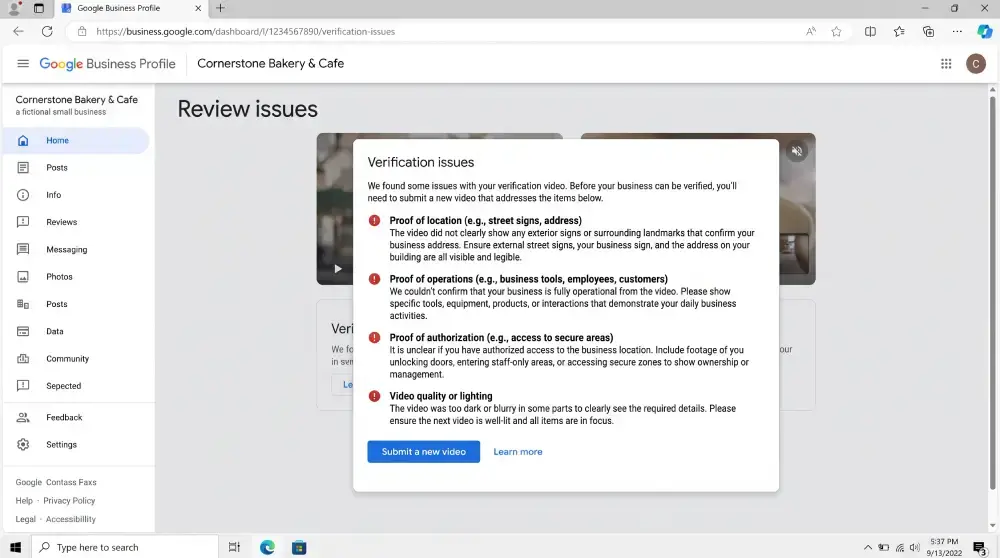
Read the issues before you re-film. The wording is generic, but it tells you which of the three proofs came up short.
When Google Loops You Back for a Second Attempt
Google's documented path after a failure is short and most people misread it. You go to your profile on your mobile device, tap Review issues, read what came up short, and record a new video. The instruction that matters is the one nobody follows: the new video must include all the information you showed in your first video, plus the missing information needed to meet the requirements.
Read that again. It is not a patch. It is a full replacement. I have watched owners get told "no nearby area shown," film thirty seconds of a street sign, submit it, and fail again — because the second video, judged on its own, had no signage and no management proof in it.
How I handle a second attempt:
- Write the issue list down. Literally, on paper. The screen isn't in front of you when you're walking backward down a driveway.
- Fix the profile first if the profile is the problem. If the issue is a name mismatch, edit the profile or change the sign before filming. Changing business information can itself trigger re-verification later, so make the change and let it settle before you record.
- Rebuild the whole sequence, longer. Everything from attempt one, plus the gap, plus one piece of redundancy for whichever proof failed. If location failed, get two location markers. If management failed, get two management actions.
- Slow down by half. Most second attempts fail because the first one was rushed and the second one was rushed harder out of frustration.
- Film it at a different time of day. Costs nothing, solves the glare problem, and gets you out of the mental rut of repeating the exact route that just failed.
Timing: Google says review can take up to five business days. In my experience it is usually faster than that and occasionally much slower, and there is no queue position to check. Plan around a week and do not resubmit into the void while a review is pending — you have no way to see it, and a second submission on top of a live review has never once sped things up for me.
Don't delete the video while a review is open. Google lets you delete verification videos at any time from Business Profile settings, under Advanced settings and then Video uploads, and says it will delete them later if you don't. Do that after you're verified, not during. If you cancel an upload mid-stream, Google's documentation notes that both you and Google lose access to that video — which means the attempt is simply gone.
When Google Offers No Verification Method at All
This is the ugly one, and it's the question I get most often from people who have already read five other articles. You open the profile, there's no Get verified button, or you tap it and video isn't offered, or nothing is offered, or the flow sends you into a form that loops back to where you started.
Start by accepting the most useful diagnosis: this is usually not a video problem. Google's published behavior is that available verification methods depend on your business type, location and category. When the menu is empty or thin, the profile itself is generally the thing being rejected, not your ability to film it.
Work through these in order
- Check you're on mobile, in the right account. The video option lives in the mobile flow. Desktop will often show you a different, shorter set of options or a QR hand-off. And if you're signed into the wrong Google account you may be looking at a profile you don't manage.
- Check whether it's already verified. A surprising number of "no verification option" cases are a profile somebody else already verified years ago. If that's the situation, you're not in a verification problem, you're in an ownership problem — different process entirely, and I've written it up here.
- Look for Review issues or an appeal notice. A profile in a restricted or appeal state frequently shows no verification options until the underlying decision is resolved. The verification menu is downstream of that.
- Audit the address for eligibility. PO boxes, mail-drop suites, virtual offices, a coworking address you can't demonstrate control of, a shared suite number used by multiple businesses. Also the inverse: a service-area business that published a street address it shouldn't have. Removing an address you're not entitled to show has unstuck more profiles for me than any other single edit.
- Try the other documented methods. Google lists phone or SMS, email, and postcard alongside video, and Google's own tip is to use video when you're eligible for it — which implies the others exist for when you're not. One caution from the help documentation that trips up trades constantly: an interactive voice response system will not receive the code. If your business line answers with a menu, phone verification fails silently.
- Ask about a live video call. This is the underused one. Under Get verified there is a Live video call option where you start a text chat and a support representative walks you onto a video call. Google notes it isn't available for every business. When it is available it is the single best outcome for a hard case, because you get a human who can ask you for the specific thing they're missing instead of scoring a recording against a checklist.
- Then, and only then, contact support. Google's stated preference is that you attempt the available methods first, because it makes the support case easier to work. So say what you tried. "I attempted video verification twice, was told no nearby area shown, refilmed with the cross street and the subdivision monument, and the profile now shows no verification options" is a case an agent can act on. "It won't let me verify" is not.
What I'd add from experience, clearly labeled as mine and not Google's: cases like this are won on documentation, not persistence. Before you open a support case, have your Arizona Corporation Commission registration, your ROC license number if you're a contractor, a Tucson Electric Power or Tucson Water bill in the business name, and a photo of vehicle signage sitting in one folder. Agents work the case in front of them, and a complete first submission routinely beats a thin one by days.
After You Pass
Verification is a gate, not an achievement. Getting through it puts you back where everyone else already is. Two things worth knowing on the far side:
First, you can be sent back. Google states that changes to your business information may require re-verification, which is a real argument for getting the name, address and category right before you verify rather than tidying them up afterward.
Second, the profile now has to earn something. A verified listing that sits untouched ranks on relevance, distance and prominence like everybody else's, and only two of those three are anything you can influence. That's a longer conversation — I've covered the current state of it in how to rank on Maps in 2026.
Stuck on a Verification Right Now?
If you're mid-loop — rejected twice, no options showing, or staring at a Review issues screen that doesn't say anything useful — call me and read it to me. Profile audits are free and there is nothing to sign. Most of the time I can tell you in a couple of minutes whether you have a filming problem, a profile problem or an address problem, and those three have completely different fixes.
Or call (520) 207-6000. You get me, not an account manager.
The Tucson Part of This
Three things about verifying a business in Southern Arizona that don't come up in the generic guides.
The light is a real variable. I'm not being cute. Reflective sign faces and vehicle lettering blow out badly under a high June sun, and a reviewer who can't read the name treats it the same as a name that doesn't match. Film before nine or after five, or shoot the shaded elevation. This one costs nothing and I've seen it flip an outcome.
Rural and edge-of-metro addresses need help. Out past Vail, through Corona de Tucson, up toward Oracle, out in Avra Valley — the terrain that makes those places worth living in is exactly the terrain that reads as unidentifiable on video. Google's instruction to avoid filming locations without clear markers is written for that situation. Find the marker: subdivision entrance monument, numbered mailbox cluster, fire district sign, cross-street blade. Two markers if you have them.
Most local trades are service-area businesses and file themselves wrong. The single most common structural error I find on Tucson profiles is a home-based contractor listed as a storefront with a residential address published. It fails verification, and when it doesn't fail verification it creates a suspension risk later. Fix the classification first. The video is downstream of it.
If You'd Rather Not Do This Yourself
Verification is inside ordinary Google Business Profile management for my clients, and it's included in the fee rather than billed as a project. The profile is rarely the whole story, though — a listing that can't verify usually sits next to a site with its own problems, so the related work is local SEO and Map Pack visibility, technical SEO when the site is the bottleneck, reputation management once the profile is live and collecting reviews, and a plain SEO audit if you just want the prioritized list before you spend anything.
It's all inside the same $1,000 a month, no contract. I work across Oro Valley, Marana, Catalina Foothills, Sahuarita, Green Valley and Vail, and I take one client per competitive niche per zone. Here's why people work with me, and here's the background you can go check.
What Clients Say
Four of the ten reviews on my Google profiles, quoted in full. Most were left on the Temecula SEO profile during the Southern California years, before the practice moved to Tucson in 2022.
David has been a huge help to my business. He's knowledgeable, responsive, and consistently delivers great work. Since working with him, we've seen strong improvements and he continues to go above and beyond to help our business grow. Highly recommend David and SEO Tucson to anyone looking for someone who truly cares about getting results.
Weston Molitor Wild West Junk Removal · SEO TucsonWe have worked with David for over a year now and he is great to work with. David has built us a great new website that we love and our Google ranking has improved significantly. David is a great guy and works day and night to help you. I highly recommend Temecula seo. Thank you David for your hard work.
Jason Moat Temecula SEODavid at TemeculaSEO is a unique professional. He has been in the industry almost longer than the web has been around. He cares about my success and spends as much time as it takes to make my business succeed. I wish that I could afford to pay him more.
Dr. Ryan Marshall, D.C. Chiropractor · Temecula SEOI made a decision to Hire David, with Temecula SEO about a year ago now, it has changed the presence of my company online greatly. I would highly recommend giving david a chance if you are looking for an honest SEO company.
Jordan Johnson Temecula SEOQuestions People Ask About Video Verification
How long does a Google Business Profile verification video have to be?
Google's published requirement is a minimum of 30 seconds, and the video must be an unedited, unique and complete recording with no breaks. Google does not publish a maximum length on its video verification help page, so the commonly repeated five minute ceiling is not a documented rule. In practice 60 to 90 seconds is enough to cover location, proof the business exists and proof of management at a walking pace, and a longer file gives you more to go wrong and more to upload.
Can I record the video in advance and upload it later?
No. Google states that you must capture the footage live, that pre-recorded videos are not allowed, and that you cannot record it offline and upload it later. The recording has to be made and submitted from a mobile device inside your Business Profile, through the Get verified flow. A higher quality clip filmed on a separate camera is not eligible no matter how well it covers the requirements, so plan the walk before you start rather than filming a draft first.
What do I film if I run a service-area business out of my house?
Google permits a home-based service-area business to record landmarks and signs in the immediate neighborhood to confirm the address, so start with a cross street sign, a subdivision monument or a numbered mailbox cluster rather than a blank wall. Then show the tools, equipment, branded vehicle, workspace or branded apparel that prove the business exists, and finish with a management proof such as unlocking a van carrying your branding, performing a service, or holding a permit, invoice or utility bill that matches the name on your profile. You do not need to film personal living spaces, and if customers are not served at your home you should not have that address published on the profile at all.
Why did my video fail when I showed everything?
The most common cause I see is a missing proof of management rather than missing footage of the business. Google wants to see you do something only an authorized person could do, such as unlocking the door, opening a cash register, using the point of sale system, entering a staff-only area or unlocking a branded vehicle. The second most common cause is a name mismatch, because the name shown in the video must match the name on the Business Profile exactly. Other documented failure causes are a recording under 30 seconds, an edited or interrupted recording, and any appearance of sensitive information such as bank, tax or identification numbers, private information, or other people's faces.
Google is asking for a second video. Do I only film the part that was missing?
No, and this is where second attempts usually fail. Google's instruction is that the new video must include all the information you showed in your first video plus all the missing information needed to meet the requirements. The replacement is judged on its own, so a thirty second clip of the one thing you were told to add will fail for missing everything else. Open Review issues on your mobile device, write down what came up short, then rebuild the entire sequence from the beginning with the gap filled and one piece of redundancy for whichever proof failed.
Google is not offering me video verification, or any verification method at all. What now?
Available methods depend on your business type, location and category, so an empty or thin menu is usually a problem with the profile rather than with your ability to film. Confirm you are on a mobile device and signed into the account that manages the profile, check whether the listing is already verified by somebody else, and look for a Review issues or appeal notice, because a restricted profile often shows no verification options until that is resolved. Then audit the address for eligibility, since PO boxes, mail drop suites, virtual offices and a service-area business publishing a street address it should not show are all common blockers. Google also lists phone or SMS, email, postcard and a live video call with a support representative, and its guidance is to try the available methods before contacting support.
How long does Google take to review the video, and should I delete it afterward?
Google says the review can take up to five business days, and there is no queue position you can check while you wait. Do not submit another video while a review is open. You can delete a verification video at any time from your Business Profile on a mobile device under Business Profile settings, then Advanced settings, then Video uploads, and Google says it will delete the video later if you do not. Wait until you are verified before deleting it, and do not cancel an upload part way through, because Google notes that both you and Google lose access to a cancelled video.
Sources
The procedural claims on this page come from Google's own documentation rather than from industry folklore, because this is a topic where the folklore is confidently wrong about at least two things. Check them yourself — and if the linked pages disagree with anything here, they are the authority.
- Google Business Profile Help: Verify your business with a video recording — the video requirements, the separate storefront and service-area filming rules, the submission steps, the five business day review window, the Review issues path, and video deletion.
- Google Business Profile Help: Verify your business on Google — the full list of verification methods, the interactive voice response caveat on phone verification, and the live video call path.
- Google Business Profile Help: service-area and hybrid businesses — how the categories are defined and when an address should not be published.
- Google Business Profile Help: business eligibility and ownership guidelines — who can have a profile at all, including why online-only businesses cannot.
- Google Business Profile Help: how local search results are determined — relevance, distance and prominence, and why verification is the beginning rather than the end.
Read Me the Rejection and I'll Tell You What It Means
Free profile audit. No charge, nothing to sign, and no pitch attached to it. I'll tell you which of the three proofs you're short, whether the problem is actually your address or your classification instead, and whether this is something you can knock out yourself in an afternoon. If it is, I'll say so.
Or call (520) 207-6000 and I'll walk the route with you on speakerphone. I have done it more times than I can count.
Tucson SEO, formerly Temecula SEO
Serving Tucson and Southern Arizona
Phone: (520) 207-6000
Consultant: David Cragg, in search since 1990
Written by David Cragg, Tucson SEO consultant, in search since 1990. I've been verifying and re-verifying local business listings since the product was called Google Places and the method was a postcard.
On how this site is written: I use AI tools to draft and to check my own work. AI does not supply the facts about your business, it does not invent sources, and nothing goes up here that I have not read first. If you find a claim on this site you can't verify, call me and I'll fix it or pull it.
Page last reviewed September 21, 2026 by David Cragg. Google changes the verification flow periodically and the options it offers vary by business type, location and category; the linked help articles are the authority if they disagree with this page.