
New State, New Name: What Happens to Your Google Reviews
Same owner, same work, same customers who loved you. Google still may decide your new company is a stranger, and the reviews stay behind.

I'm David Cragg. I ran Temecula SEO in Southern California from 2007 until June 2022, when I moved the practice to Tucson and renamed it SEO Tucson. Same consultant, same services, same phone answered by the same person. Nine of my ten Google reviews still sit on the old Temecula SEO profile, and there is no button anywhere in Google that moves them. I did this to my own business, so what follows is not theory.
The question I get from owners who are moving is always some version of "how do I get Google to move my reviews to the new profile?" The honest answer depends on two things: whether you kept your business name, and whether you have already created a second profile. Get those two decisions right and you often keep everything. Get them wrong and no support ticket will fix it.
This page covers the move itself: what Google's rules say, how to pick your path before you touch anything, the order to make changes in, how to move the website and domain, and how to carry your track record across when the reviews can't come with you. Where Google's documentation says something plainly, I link it. Where I'm telling you what I've seen, I say so.
The short version
- Reviews belong to a profile, not to you. Google has no export and no transfer between two unrelated profiles.
- Same name, new address: the reviews come with you. Google moves them automatically when a business relocates and keeps its name, with a few category exceptions like hotels.
- New name that isn't a minor change: Google treats you as a new business. A new name plus a new state is the clearest case of this there is.
- Decide before you create anything. The most common way owners lose reviews they could have kept is opening a new profile first and asking questions second.
- What can't move on Google can still move on your website. A redirected domain, entity markup that names the old brand, and honestly attributed testimonials carry your history across.
What Google Actually Says About Moving Reviews
Google publishes the rules on a help page called Move your reviews across Business Profiles. It is short, and most of the confusion online comes from people who never read it. It sorts changes into a handful of situations, and the outcome in each one is different.
| What changed | What happens to the reviews | What you should do |
|---|---|---|
| New address, same business name | Google transfers them automatically. Hotels, golf courses and scenic attractions may be exceptions. | Edit the address on the existing profile. Do not create a new one. |
| Minor name change | They stay on the profile. | Edit the name field on the existing profile. |
| New owner or manager, same name | They stay on the profile. | Transfer ownership of the existing profile and reply to older reviews to explain what changed. |
| New name that is not a minor change | Google considers it a new business. The reviews stay with the old profile. | Start the new profile clean and bring your history across on your website. |
| Business closed, temporarily or permanently | They remain on the profile, which stays visible as closed. | Decide whether the old profile should read as closed or stay as it is. More on that below. |
Read the fourth row twice, because it is the row most people moving to a new state end up in. Google's test is about what the business is, and the name is one of the strongest signals it has. "Temecula SEO" to "SEO Tucson" is not a minor change. Neither is "Riverside Plumbing" to "Sonoran Plumbing & Drain." The owner, the services and the phone number being the same does not change the outcome.
Google does not define "minor" precisely on that page. From the changes I've watched go through, adding or dropping a word like "LLC" or "& Sons," or correcting a spelling, tends to be treated as the same business. Replacing a place name with a different place name, or replacing the brand entirely, tends not to be. Treat that as observation, not policy.
Pick Your Path Before You Touch the Profile
Everything else in this article follows from one decision, and it has to be made before you open Google Business Profile, not after. Answer these in order.
- Are you keeping the business name? If yes, you are in the relocation row. Your reviews move when you edit the address. This is by far the best outcome, and if the name is not tied to your old town it is worth seriously considering keeping it.
- If the name changes, is the change minor? If you are only dropping a descriptor or adding "LLC," edit the existing profile. If the name is genuinely different, you are starting a new business as far as Google is concerned.
- Have you already created a second profile? If you have, stop editing both. Two live profiles for what Google may see as one business is a duplicate problem, and I cover that below.
- Are customers coming to you, or are you going to them? A storefront move changes a public address and a map pin. A service-area move changes the area you serve and a hidden address. Both go through the same review rules, but a service-area business crossing a state line almost always goes back through verification.
If your old business name has the old city in it, this is the moment to think hard. A name like "Temecula SEO" ties you to a town you've left. Keeping it keeps the reviews, and it also puts a California city on an Arizona listing, which is its own trust problem with customers. Choosing a new name and accepting the cost is a legitimate trade, but it should be a decision, not an accident. If you do rename, weigh the name the way a prospect will search it: a name and domain that carry your new city and your service work as keywords every time they appear.
If You Kept the Name: Edit, Don't Recreate
This is the simple case, and the only way to ruin it is to get impatient. Sign in with the account that owns the profile, change the address or the service area to the new location, update the phone number if it changed, and leave everything else alone for a few days. Google will very likely ask you to verify again, because an address in a different state is the kind of edit it checks. Plan for a video verification and have the new location ready to film. I wrote up what to film and why verification videos get rejected separately.
Two things I'd add from experience. First, make the address change on its own, not in the same sitting as a new category, new hours and a new website. A single large edit is easier for Google to evaluate than five at once. Second, if you don't control the account that owns the profile, fix that before you move. Recovering ownership from a former vendor is much harder once the listing shows an address the old owner never saw. The ownership recovery process is its own article.
If the Name Changed: The Reviews Stay Behind
This is the part nobody wants to hear, so I'll say it directly. If your new name is not a minor change, there is no documented way to make Google move reviews from the old profile to the new one. Not through support, not through an ownership transfer, and not through a merge request. Merges exist to fix duplicate listings of the same business. A request to merge two profiles that Google's own rules say are different businesses is not the use it was built for.
You will see a workaround recommended on forums: move the address first under the old name, wait, then change the name in small steps until the old brand has turned into the new one. I don't do this for clients. Google's test is what the business is, not how many edits it took to get there. A profile that ends up with a new name, a new state and a stack of reviews describing work done five hundred miles away can be flagged as a different business anyway, and then you are fighting a suspension instead of starting fresh. The reinstatement process is not where you want to spend your first month in a new market.
The clean path looks like this:
- Create and verify the new profile under the new name, at the new location, with a category that matches what you actually do there.
- Deal with the old profile deliberately. If the old business has stopped operating at that location, marking it permanently closed is accurate. The reviews stay visible on it, and anyone searching the old name learns the business has closed rather than finding a dead phone number.
- Keep ownership of the old profile. Don't delete it and don't hand it to anyone. It is the permanent public record of your reviews, and it is the thing you'll point to when a new customer asks how long you've been doing this.
- Build the bridge on your website, where you do control what appears. The next three sections cover that.
If you already created a new profile while the old one was still live under the same name, you have a duplicate, not a rebrand. That one Google can sometimes fix. Use the duplicate profile process, stop editing the newer listing, and expect it to take weeks.
The Order to Make the Changes In
Most of the damage I clean up after a move comes from doing the right things in the wrong order. The profile is the last public step, not the first, because Google checks it against everything else it can find about you.
- The legal side. Settle the entity and the name in the new state first. In Arizona that means deciding whether to form a new company or register your existing one here with the Arizona Corporation Commission, and registering a trade name if you'll operate under a name that isn't the company's legal name. Contractors will also need an Arizona Registrar of Contractors license in the business name. Every document you'd use to verify later should carry the exact name that will be on the profile. I'm not a lawyer or an accountant, so have one confirm which structure fits your situation.
- The phone number. If you can keep the old number, keep it for at least a year. Past customers still have it, and it's one of the few details that connects the old business to the new one in Google's eyes. Add a local number if you want one, but don't abandon the old one on moving day.
- The website. The new name, new address and the story of the move go live on the site before the profile changes, so that when Google compares the profile to the website they already agree.
- The domain, if it's changing. Redirects and the Search Console move, covered in the next section.
- The Google Business Profile. Edit the existing one, or create the new one, depending on which path you're on.
- Everything else. Directories and other listings, once the profile is verified. Updating citations with the old name, old city and old phone number is the cleanup that takes longest after a move. The list of places that need to match is on the Maps guide.
Moving the Domain Without Losing What It Earned
If your domain has the old name or the old city in it, you'll probably move to a new one. A domain move is the one part of a rebrand where Google gives you a documented way to carry the history across, and the reviews are the part where it doesn't. So do this part well.
- Redirect page to page, not everything to the homepage. Each old URL gets a permanent 301 redirect to its closest equivalent on the new domain. The old plumbing service page goes to the new plumbing service page. Redirecting everything to the new homepage throws away most of what those pages earned.
- Use the Change of Address tool in Search Console. Verify both domains in Search Console, set up the redirects, then run the Change of Address tool from the old domain's property. The tool checks for the redirects before it will submit. It tells Google to prefer the new site and forward signals from the old one.
- Keep the redirects running. Google says to maintain them for at least 180 days, longer if the old URLs still get search traffic. I'd keep them in place indefinitely. They cost nothing and the old links on other sites keep working.
- Keep paying for the old domain. Google recommends holding it for at least a year so nobody else buys it and uses your old name. I'd hold it for as long as the old brand means anything to anyone.
- Update the links you control. Your profile, your social accounts, your email signature, directory listings, and any partner sites that will change a link for you. A redirect works, but a direct link is better.
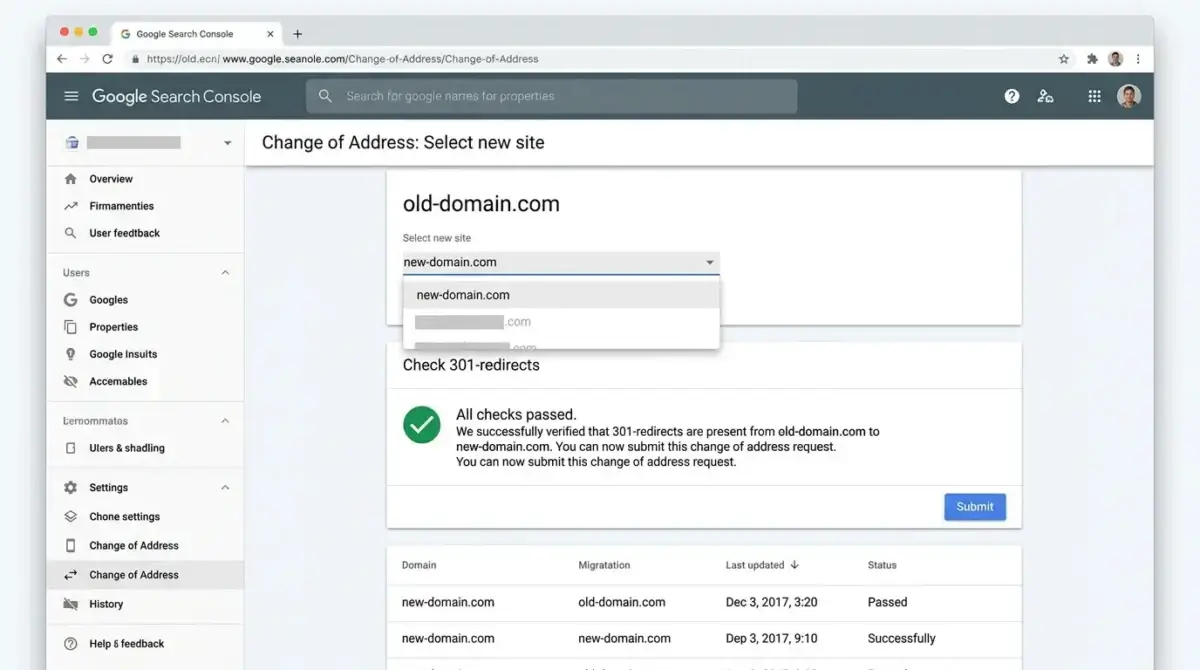
The redirects and the Search Console move are technical work. If you'd rather not map a few hundred URLs by hand, that's part of my technical SEO service, and a rebuild under the new brand is the website design side.
Telling Google the Old Brand and the New Brand Are the Same Business
Your Google profile may have to start over. Google's understanding of your business as a whole doesn't have to. Search engines and AI assistants build a picture of a business from every place it's mentioned, and a rebrand leaves two half-pictures unless you connect them. You connect them in three places.
In plain words on the site. Say "formerly [old name]" near the top of the homepage, in the footer and on the About page. Give the move its own paragraph on the About page with dates: where you were, when you moved, what stayed the same. That paragraph is for customers first. Search engines read it too.
In the structured data. The Organization or LocalBusiness markup on your site can carry an alternateName with the old brand name, and a sameAs list pointing at the profiles that belong to the business under either name. That's a direct, machine-readable statement that both names describe one entity. On this site, "Temecula SEO" is listed as an alternate name in the sitewide markup that every page references.
On the listings you still control. The old social accounts and directory listings can be renamed or pointed at the new site rather than left to rot. An old listing that says "now SEO Tucson, see tucson-seo.net" is doing useful work. An abandoned one with a disconnected number is doing harm.
None of this moves a single review. What it does is make sure the history your reviews describe still attaches to you everywhere except inside the Google profile itself.
Using Your Old Reviews on Your New Website
The reviews on your old profile are real, public and yours to quote, as long as you're honest about where they came from. I do this across this site. Each testimonial names the reviewer and which profile it was left on, and the page says plainly that most were earned under the Temecula SEO name in Southern California before the move. A reader in Tucson deserves to know that a review describes work done in Murrieta.
Two rules keep this on the right side of both Google and the law.
- Don't mark them up as review stars. Google's review snippet guidelines don't allow a business to mark up reviews of itself on its own site for star ratings. Show them as ordinary text on the page. You lose nothing, because those stars were never going to appear anyway.
- Don't misrepresent them. Quote them in full or not at all, keep the reviewer's name as it appears on Google, and never present a review of the old business as if it were left on the new profile. The FTC's rule on consumer reviews and testimonials covers reviews that misrepresent the reviewer's experience, and the penalties are real.
The new profile builds its own reviews from scratch, from customers in the new market. How to ask for them without breaking Google's rules is covered in detail in how to get more Google reviews, so I won't repeat it here. One point that's specific to a move: don't ask your old customers back in the old state to review the new profile. They didn't buy from the new business, and a burst of reviews from five hundred miles away is exactly the pattern that gets filtered.
What Moving Temecula SEO to Tucson Actually Looked Like
When I moved in June 2022, the name was the whole problem. "Temecula SEO" has a city in it, and the city was now in the wrong state. It was not an appropriate name for a Tucson practice, and keeping it for the sake of the reviews would have meant introducing myself to every Tucson prospect as a business from somewhere else.
I chose SEO Tucson because it was the best available name that carried both things a prospect actually types: where I am and what I do. That was not branding for its own sake. For a local service business, the company name and the domain are keywords. They show up in the profile, in the URL, in every citation and in every link someone else writes, and they tell both the searcher and Google what the business is before anyone reads a word of the site. Trading a name that said "Temecula" for one that says "Tucson" and "SEO" was worth more to me over the long run than the reviews were.
That choice put me squarely in the fourth row of the table above: a new name, a new state, and a Google profile that started over.
The reviews stayed where Google's rules said they would. Nine of my ten sit on the Temecula SEO profile, earned between 2007 and 2022. Two clients, Dr. Bao Nguyen and Weston Molitor, left reviews that name SEO Tucson. What I did instead of fighting Google was put the whole record on my own site, in full, with each review labeled by the profile it came from. Every page carries "formerly Temecula SEO." The About page lays out the dates and the history, and the case studies name the Southern California clients and say where they are, rather than letting a Tucson reader assume they're local.
The lesson I take from it is the one this page is built around. With a new name, the reviews were never coming, so the effort belongs on the parts you can carry: the website, the entity markup that names the old brand, and an honest record of the old reviews. Make the name decision first, and connect the history on day one.
What to Expect in Rankings in the New Market
Even the owners who keep every review are often surprised by this part. Reviews move with a relocated profile. Rankings don't, not directly. Map results depend heavily on distance from the searcher, and your old position was earned against old competitors in an old city. In the new market you start close to zero on distance and relevance for local searches, however many stars you bring.
What carries over is prominence: the reviews if you kept them, the website's authority if you redirected it properly, and the links and mentions that point at you. Those give you a head start over a genuinely new business. They don't give you the new town's top three on day one. Expect the first real movement in the map in a few months, not a few weeks. How Google weighs relevance, distance and prominence, and what moves each one, is covered in the Maps guide.
Moving to Tucson, or Renaming Before You Do?
Call before you change anything on Google. I'll look at your current profile, your name, your domain and where you're headed, and tell you which path keeps the most of what you've built. The first look costs nothing and there's nothing to sign.
Or call (520) 207-6000. Profile management, the domain move and the new site are all inside the same $1,000 a month, no contract, alongside ongoing Google Business Profile management, reputation management and local SEO in the new market.
What Clients Say
Four of my ten Google reviews, quoted in full. All four were left on the Temecula SEO profile during the Southern California years, which is the point of this article: they stayed there when I moved.
David at TemeculaSEO is a unique professional. He has been in the industry almost longer than the web has been around. He cares about my success and spends as much time as it takes to make my business succeed. I wish that I could afford to pay him more.
Dr. Ryan Marshall, D.C. 5.0 Google review, Temecula SEO profile
We have worked with David for over a year now and he is great to work with. David has built us a great new website that we love and our Google ranking has improved significantly. David is a great guy and works day and night to help you. I highly recommend Temecula seo. Thank you David for your hard work.
Jason Moat 5.0 Google review, Temecula SEO profile
If you are looking for help with SEO, or anything related, David is your man! I talked to several other companies before talking to David, and I knew right away he was different. He is extremely professional, responsive, affordable, and effective. Most importantly, I trust that he is looking out for my best interest. He takes a very hands-on approach and always takes the time to listen to the changing needs of my professional business. His wealth of knowledge is invaluable. He had my business seeing results almost immediately. Thank you David for all your hard work! Best in the business!
Luke Hendrix 5.0 Google review, Temecula SEO profile
Dave does much more than "just" SEO, or at least he does everything even tangentially related to SEO. Not just finding keywords and maximizing them, but rather looking at things at their foundation so we get the best possible results. Dave is very hands-on and blazingly fast with execution. I'm sure I've tried his patience as I know just enough to be annoying and not near enough to do a good job of this myself. He manages to explain what I need explained in a "for dummies" level but without making me feel like an idiot.
With a lot of people our company works with, we are ready for their services/delivery/etc. before they are. This is especially true of some of our previous marketing efforts. We try not to get too impatient. With Dave on the other hand, we can't keep up. And our results have improved dramatically very quickly!
Marc Rowen 5.0 Google review, Temecula SEO profile
Questions About Keeping Reviews Through a Move or Rebrand
Can Google move my reviews to a new Business Profile?
Do my reviews stay if I only change my business name?
Do reviews follow my business if I move to another state?
What happens to the reviews on my old profile if I mark it permanently closed?
Can I put reviews from my old profile on my new website?
How long should I keep redirects from my old domain?
Does forming a new company in the new state make me a new business to Google?
Sources
The rules on this page come from Google's and the FTC's own documentation. Where I'm describing what I've seen rather than what's published, the text says so.
- Google Business Profile Help: Move your reviews across Business Profiles. Relocation, name changes, new management and closed businesses.
- Google Business Profile Help: Resolve duplicate profiles and ownership issues. What a merge is for.
- Google Business Profile Help: Guidelines for representing your business on Google. Naming and address rules for the new profile.
- Search Console Help: Change of Address tool. The 180-day redirect period and the advice to keep the old domain.
- Google Search Central: Review snippet structured data. Why a business can't mark up its own reviews for stars.
- Federal Trade Commission: Consumer Reviews and Testimonials Rule, questions and answers. Using reviews honestly.
SEO Tucson, formerly Temecula SEO
David Cragg, SEO consultant, in search since 1990. Serving Tucson and Southern Arizona.
Phone: (520) 207-6000
Written by David Cragg. Published and last reviewed September 21, 2026. I use AI tools in research and drafting. Every page on this site is reviewed, edited and checked against the linked sources by me before it publishes. Google changes these rules from time to time, and the linked help pages are the authority if they disagree with this one.