How to Get More Google Reviews Without Breaking the Rules
The request system, not the ranking theory. Where the link lives, when to ask, what to say, and the arithmetic behind how many you need every month.
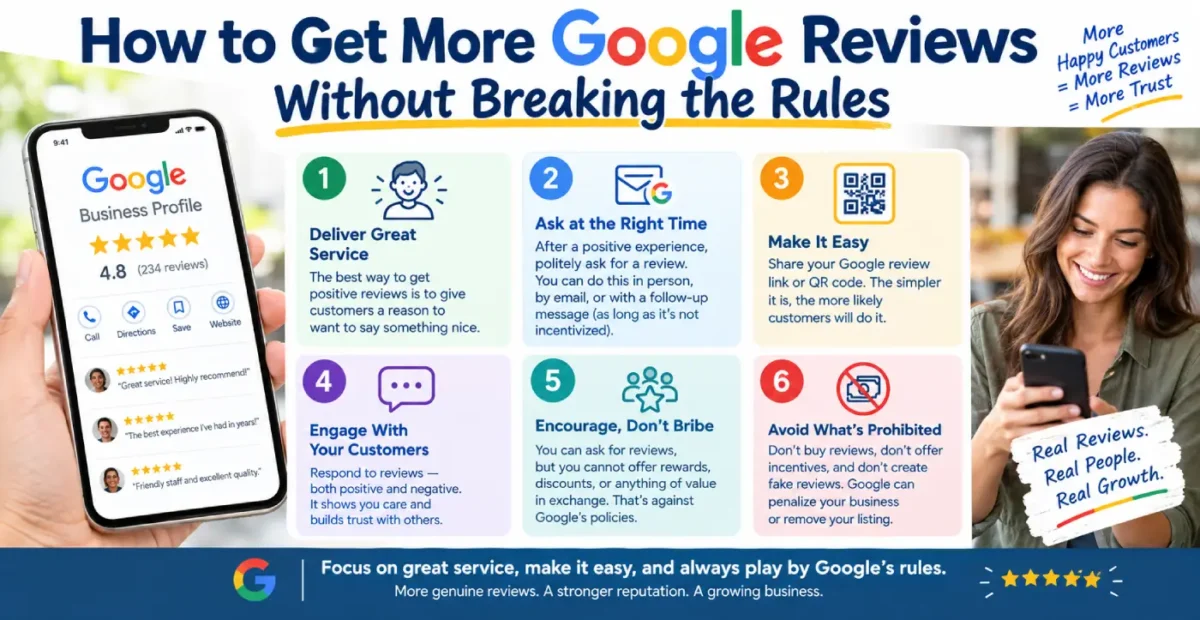
I'm David Cragg. I've been in search since 1990, and I've run review programs for plumbers, HVAC contractors, junk haulers and dental practices in Southern Arizona and Southern California. This is the process I hand clients, including the parts Google changed in 2026.
The Short Version
- Your review link comes out of the profile itself: Read reviews, then Get more reviews. Google generates the short URL and the QR code for you.
- Ask once, after the customer has left, to their own phone, with no instructions about what to write.
- Text beats email for anything done in person. Email wins when the work finishes without a face-to-face moment.
- Staff can ask. Staff cannot be given a quota, and nobody can be asked to name a technician.
- Three to four new reviews a month keeps your recent history full. That number doesn't go up because your lifetime total is large.
Most businesses don't have a review problem. They have a request problem. The work is good, the customers are satisfied, and nobody ever asks them — or somebody asks in a way that gets the reviews filtered out three weeks later.
This page is about the request system. Where the link comes from, when the ask goes out, what medium carries it, who on your staff does it, what they're allowed to say, and how many you need per month to keep your profile from looking abandoned. If you want the ranking side of the profile — categories, service lists, photos, what Google switched off — that's on the Google Business Profile page. This one is the plumbing.
I'll say up front where my numbers come from, because you should ask that of anyone writing about this. The response rates and the filtering losses below are what I observe across my own client accounts, where I either send the requests myself or built the system that sends them. They are not survey figures. Where I cite a survey or a policy, it's linked, and every policy claim on this page points at Google's own documentation rather than at somebody's blog post about it.
The Rules, Stated Plainly
Start here, because almost every review program I inherit has one of these baked into it, and the owner has no idea.
Google's position is not that asking is suspicious. Google publishes its own tips for getting more reviews and tells owners to remind customers. The rules are about how you ask. They live in the prohibited and restricted content policy, and profiles that break them can have new reviews blocked or existing reviews unpublished for a period — Google spells out those restrictions for policy violations in a separate document that is worth five minutes of your time.
Allowed
- Asking every customer, once, after the job.
- Sending your review link by text, email or WhatsApp.
- A QR code on an invoice, a leave-behind card, a vehicle or a receipt.
- Staff mentioning reviews as part of a normal handoff.
- Replying to every review you get.
Not allowed
- Any incentive — discount, gift card, free filter, entry into a drawing.
- Screening customers first and only sending the link to the happy ones.
- Pressuring or requiring a review while the customer is still on your premises.
- Telling staff to bring in a set number of reviews.
- Asking a customer to include specific content, including a staff member's name.
The last two arrived on April 17, 2026, and they retired two tactics that half the industry was still selling. Review contests for technicians are out. "Mention Kyle so he gets credit" is out. If your dispatch software has a review leaderboard in it, turn the leaderboard off.
There's a second body of law underneath all this. The FTC's rule on consumer reviews and testimonials took effect in October 2024 and carries civil penalties. Google can hide your reviews. The FTC can fine you. Buying reviews, writing them yourself, and suppressing negative ones are federal problems now, not just platform problems.
One thing worth saying out loud: the compliant version of this is also the version that survives. Reviews collected on a shop tablet come from one device and one IP address, and Google's filters treat them accordingly. Reviews collected through a gated form arrive in a suspiciously clean five-star pattern. Plain asks sent to a customer's own phone are the ones that stick.
Step One: Pull Your Review Link Out of the Profile
You need a short URL that drops a customer directly onto the review form with the stars already showing. Not your homepage. Not "search for us on Google." One tap, five stars, a text box.
Google generates it for you, and the path changed when the old dashboard went away. Here is the current one, from Google's own instructions:
- Sign into the Google account that manages the profile. Not your personal account, and not the account your last marketing company used — if you can't get in, that ownership problem is the actual first job.
- Search your business name in Google, or open your Business Profile directly. The management panel appears above the public listing.
- Select Read reviews, then Get more reviews. Depending on what Google is showing you that week, the tile may read Ask for reviews. Same destination.
- Select Copy to take the link. To take the QR code, right-click it and save the image.
- Paste the link into a note, a document, your invoicing software and your phone's text shortcuts. Everybody who asks for reviews needs it in their pocket.
Two details that catch people out. The QR code can only be generated in a desktop browser — you cannot produce it from the phone app. And if you manage more than one location, each location has its own link. Sending the wrong one is how reviews for the Oro Valley shop end up on the Marana listing, and Google will not move them.
Don't go hunting for a short name. The old g.page/YourBusiness custom URL is finished. Google's help page now says flatly that you can no longer create or edit short names. Existing ones still resolve, but they're no longer displayed and you can't claim a new one. If a vendor is charging you to "set up your branded review URL," that's a service that no longer exists.
If you want a link you control — one you can point somewhere else later, or track clicks on — put your own redirect in front of Google's. Something like yourdomain.com/review that forwards to the Google URL. Then the card you printed last year still works after Google reshuffles something. I set this up on client sites as a matter of course; it's a five-minute job on the website side and it has saved two of my clients a reprint.
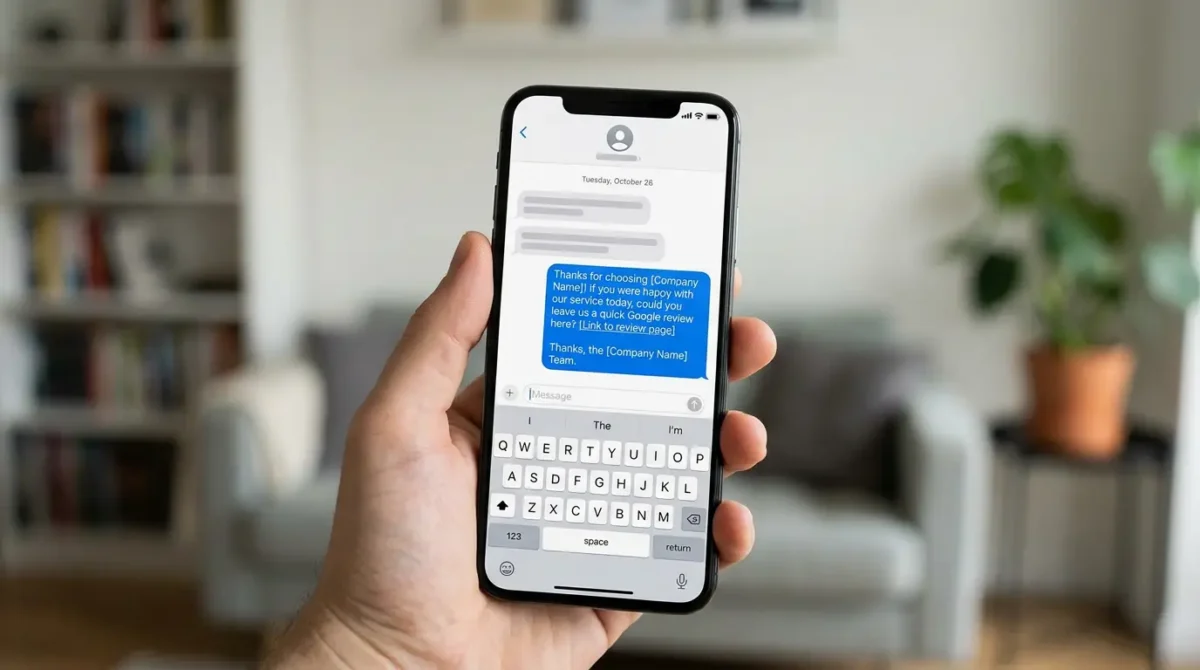
The whole ask. Two lines, the business named in the first four words, the link last. Anything longer gets skimmed, and a bare link from an unknown number reads as spam.
Step Two: Ask at the Right Moment
Timing moves the response rate more than the wording does. There is a window after a job where the customer feels relief, and it closes fast. Miss it and you're asking a stranger for a favor.
The window is not the same in every trade, and this is where generic advice fails. Three shapes I see:
Relief jobs
Emergency plumbing, AC out in July, lockouts, tow trucks. The peak is the moment the thing works again. Ask within the hour, before the invoice lands and reframes the whole experience around price.
Project jobs
Roofing, remodels, landscaping, junk removal on a big cleanout. The peak is the walkthrough, when the customer sees the finished result. Ask that evening, not at the walkthrough itself.
Relationship jobs
Dentistry, chiropractic, law, accounting. There's no single dramatic moment. Ask after the visit that resolved something — the crown that fit, the case that closed, the refund that came through.
Three rules that hold across all of them:
- Ask after they've left, not while they're standing there. This is both a policy matter and a practical one. Google's policy prohibits pressuring customers to review while on the premises. And a review written in your lobby under your eye is short, generic and easy for a filter to spot.
- Ask once. Then one reminder, three or four days later, if nothing came in. Then stop. A third ask costs you goodwill and buys nothing.
- Don't ask when you already know the answer. Not because you're screening — you're not allowed to screen — but because a customer with an unresolved complaint needs a phone call, not a review link. Fix the problem. Ask later, or don't.
That last point is the line people get wrong. Sending the link to everyone and sequencing the unhappy ones through a resolution call first is fine. Building a form that asks "how did we do?" and only shows the Google link to people who click four or five stars is review gating, and it's a policy violation.
What Tucson's Calendar Does to the Math
This is the part no national guide will tell you, and it's the reason I don't hand a client a flat monthly target and walk away. Southern Arizona has a seasonal shape, and review flow follows it.
- June through September is your volume. AC failures, monsoon roof and irrigation damage, wind cleanup. These are relief jobs with the sharpest emotional peak of the year, and they produce your best response rates. This is when the pile gets built.
- October through April brings the winter residents. In Green Valley, Oro Valley and Catalina, a large share of your customers are seasonal and older, and that group leaves fewer reviews from a text link. Response rates drop. Print matters more here, and a phone follow-up from a person works where a text does not.
- May and late September are the dead spots. Not because customers are unhappy — because job volume dips between seasons. If you only ask when it's busy, your profile shows a two-month gap twice a year, and that gap is what a prospect in October sees.
The practical move is counter-intuitive: ask hardest in the slow months, not the busy ones. If July gives you eight reviews and October gives you two, your average still clears the target, but the newest review in mid-November is six weeks old and the average is doing you no good. Averages don't show on your profile. Dates do. That one adjustment is the change I make most often on Tucson accounts.
Step Three: Text or Email
Both work. They work in different situations, and most businesses pick one out of habit rather than fit.
| Channel | Best for | Typical response | The catch |
|---|---|---|---|
| Text message | Any job done in person, same day. Trades, mobile services, walk-in retail. | Highest — often two to three times email | You need the mobile number and a reason they recognize you. Send from a number they've already texted. |
| Work that finishes without a handoff. Professional services, B2B, anything invoiced later. | Moderate, and slower — replies trickle in over a week | Subject line decides everything. Put the link high; half of them never scroll. | |
| Printed QR code | Backup and reminder. Invoices, leave-behind cards, vehicle wraps, counters. | Low on its own, useful as reinforcement | Nobody scans a code without a prompt. It supports the ask; it isn't the ask. |
The practical answer for most local service businesses here: text as the primary, email as the fallback for anyone who didn't give you a mobile number, QR code on the invoice so the request exists in a second place. The real exception is the winter-resident accounts above, where the age of the customer base flips the ranking and a printed card outperforms a text.
Text discipline matters. Keep it under two lines. Identify yourself in the first four words. Send it between roughly 9am and 7pm, and don't send at 6am because that's when your dispatcher runs the report.
Step Four: Where the QR Code Actually Goes
QR codes get printed and then placed where nobody is holding a phone. That's the whole failure mode. A code works when the customer's phone is already in their hand and something has just been completed.
Placements that earn their printing cost:
- On the invoice or receipt, next to a printed line of text that asks. The code alone does nothing.
- On a leave-behind card the technician hands over with the paperwork. It goes on the fridge, which means the ask survives a day or two past the visit.
- At the payment point, where the customer is already looking at their phone to tap or pay. Not a sign at eye level across the room.
- On the back of a business card, which costs nothing extra on the next print run.
- Inside the email signature of whoever does your billing, as a link rather than an image.
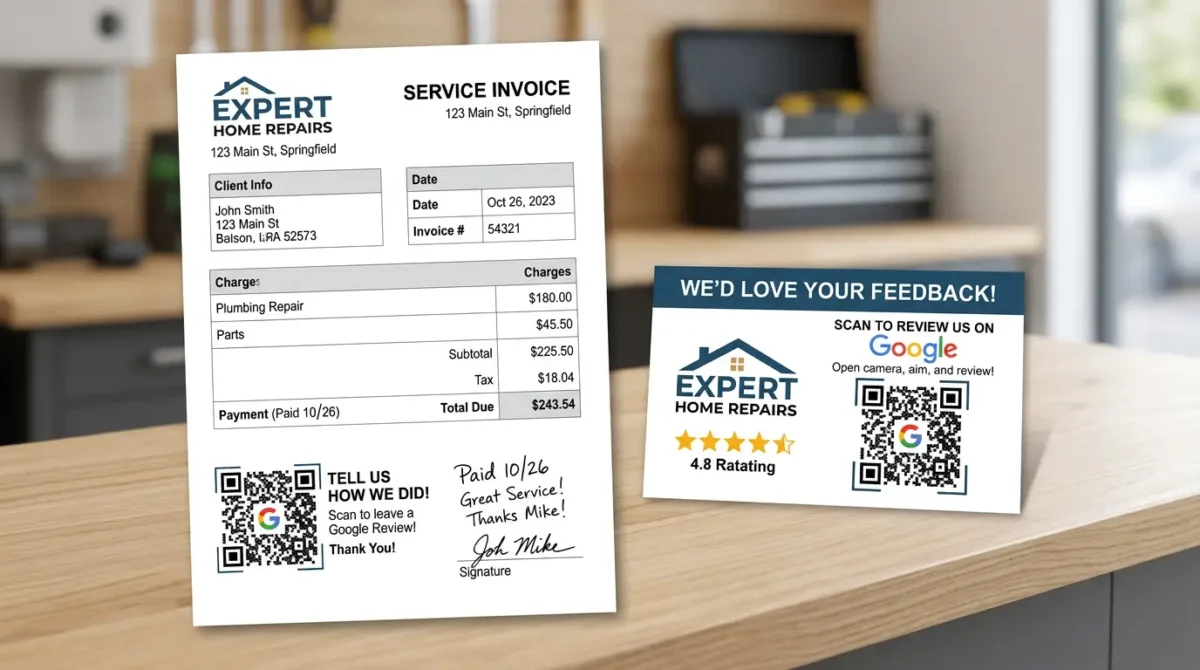
Two placements that work, because in both the customer is already holding paperwork and a phone. A code taped to the wall behind your counter is not the same thing.
Placements that don't: a laminated sheet taped to a wall behind the counter, a sticker on the front door, a banner in the waiting room, the back of a vehicle in traffic. And a tablet on your counter with the review form open is not a placement — it's the thing Google specifically told you not to do.
One more: if you print the code, print it big enough and test it from four feet away with a cheap phone in bad light. I've seen a run of 5,000 invoices go out with a code that only scanned at six inches.
Step Five: What Your Staff Can Say
The April 2026 policy update rewrote this section for everyone. Your staff can still ask. What changed is the machinery around the asking.
What you can't do anymore: set a review target per technician, run a contest, tie a bonus to review count, or coach anyone to request that the customer name a person or mention a specific service. Google names both the quota and the staff-name request as prohibited. If a customer decides to name their tech on their own, that's fine and it's a great review. Asking for it is the violation.
What you can do: teach a short, plain handoff. Three that work:
"Glad that's sorted. I'm going to text you a link — if you've got a minute later, a Google review really helps people find us."
Field technician, at the end of a job Names the channel, sets the expectation, no instructions
"Your receipt has a QR code at the bottom. That goes straight to our Google page if you'd like to leave us a review."
Front desk, at checkout Points at the code without standing over them
"Thanks for being patient with the scheduling on this one. If the work itself was good, a Google review would mean a lot to us."
Owner, following up by phone Acknowledges the rough patch, asks anyway, no conditions
Notice what's missing from all three. No star count. No "five-star." No suggested wording. No mention of a name. No offer. The moment you tell a customer what to write, you've given Google a reason to filter it and given yourself a compliance problem.
Train it the way you train anything else in the field: say it out loud in the truck until it stops sounding like a script. The technician who mumbles a rehearsed line gets fewer reviews than the one who says it like a person.
The Arithmetic: How Many a Month
This is the part nobody does, and it's the part that decides whether the program works. "Get more reviews" isn't a target. A number per month is.
Work it backwards from what a customer sees. Two calculations.
Calculation one: keeping your recent history full
When somebody opens your reviews, Google loads roughly ten at a time. Those ten are what your reputation is, as far as that customer is concerned.
Google sorts that block by Most relevant by default, not by newest. You don't control that order. What you control is the dates on the reviews available to be shown, and what happens the moment a skeptical customer switches the sort to Newest — which is exactly what a careful buyer does.
So: at a steady rate of r reviews per month, your trailing ninety days holds about 3r reviews. To fill that first block of roughly ten with reviews from the last three months, you need r of about three and a half. Round it up.
Three to four a month is the number. That's the whole answer, and here's why it matters that it's three to four and not one: BrightLocal's 2026 consumer survey found that 74% of consumers look for reviews written in the last three months, and 32% want something from the last two weeks. At one a month, arrival is lumpy enough that you'll routinely have three-week gaps. At four a month, you average one every seven or eight days and the two-week window stays covered even in a slow stretch.
The same survey found 47% of consumers won't consider a business with fewer than twenty reviews at all. If you're under twenty, your first job is volume; get to thirty and then settle into the monthly rhythm.
And the part that surprises owners: the number does not drop because your lifetime total is high. Three hundred reviews with nothing in the last eight months reads worse than forty reviews with one from last Tuesday. Recency is a flow, not a balance.
Calculation two: how many asks that takes
Reviews per month equals asks per month times your response rate. Response rate on a plain text ask, sent same-day with a working link, runs somewhere between fifteen and forty percent depending on trade and how good the moment was. Here's what that means for ask volume:
| Jobs completed per month | At 15% response | At 25% response | At 40% response |
|---|---|---|---|
| 10 | 1 to 2 | 2 to 3 | 4 |
| 20 | 3 | 5 | 8 |
| 40 | 6 | 10 | 16 |
| 80 | 12 | 20 | 32 |
Read the top row carefully, because that's the one that hurts. A business doing ten jobs a month cannot hit four reviews a month unless nearly half of everyone asked follows through. If that's you, the ask has to be excellent — texted the same day, from a person, at the right moment — and you should expect to be at two or three most months. That's fine. Two or three a month, held for a year, is thirty reviews and a profile that never looks dead.
A business doing forty jobs a month has the opposite problem: plenty of raw material, and it usually asks about six of those forty customers. Fixing the process, not the satisfaction, is what moves that account.
The diagnostic is simple. Count your completed jobs last month. Count your new reviews last month. Divide. If you're under ten percent, you have a request problem, and no amount of doing better work will fix it.
Calculation three, for the honest version
Subtract for filtering. Some percentage of what you collect will never post — wrong account, no Google login, caught by a filter, written and abandoned. Across my client accounts it's usually a small slice, but it's not zero, and it's worst on the accounts with an older customer base. Build in a margin: if you need four, aim to generate five.
Track It on One Line a Month
You don't need software for this. You need a spreadsheet with five columns and a monthly habit.
- Jobs completed — from your invoicing, whatever number you already have.
- Asks sent — the count of texts and emails that actually went out.
- New reviews — from the profile, counted on the first of the month.
- Response rate — new reviews divided by asks sent.
- Days since the newest review — the single number that tells you whether your profile looks alive today.
That fifth column is the one I check first on every account. If it's ever above twenty-one, the program has stopped and nobody noticed. It's also the number that makes the case for the whole exercise, because it moves within a month of fixing the process.
Review platforms automate the sending and they're worth the money above a certain volume. Below about forty jobs a month, a saved text template and a habit beat a subscription. What software will not do is make a bad ask work, and it will happily help you build a gated funnel that gets your reviews pulled.
What Usually Goes Wrong
- The link is wrong or dead. Somebody saved a URL from an old dashboard, or from a short name that no longer displays. Test your own link on a phone you aren't signed in on, today.
- The ask lives with one person. The office manager sends them, the office manager goes on vacation, the program stops for two weeks. It has to be part of closing a job, not one person's side task.
- It runs as a campaign. Forty reviews in a month, then nothing for a year. That pattern reads as a review push to customers and to Google's filters both.
- Nobody replies. Not a request problem, but it undercuts everything upstream. Reply to all of them, briefly, in your own words.
- Somebody buys some. It shows up in the pattern, the FTC rule makes it a federal matter, and the cleanup costs more than the shortcut saved.
Who Wrote This

I'm David Cragg. I've been in search since 1990 — before Google existed and before local search was a category. I hold a BA in Economics from UCLA and an MBA from the University of Washington, and I founded and sold two internet marketing companies, Lotus411 and MSD2D, before starting Temecula SEO in 2007 and moving the practice to Tucson in 2022.
I keep a small client roster and do every part of the work myself, which means the review programs behind the numbers on this page are ones I run — including a junk hauling company and a dental practice I've worked with for over a decade. There's no account manager and no junior handing this off. When you call (520) 207-6000, I answer.
The client reviews below were earned on my former Temecula SEO Google profile in Southern California, not on my Tucson listing, and I'd rather say that than let you assume otherwise. This page was drafted with AI assistance and then sourced, edited and fact checked by me. Every policy claim above links to Google's own documentation or to the trade coverage that dated it. I explain how I use AI, and what I don't let it do, on the content writing page. More background, with the filings and press coverage you can check, is on the about page.
What Clients Say About Working With David
I ask the way I've described above: once, after the work is done, with no script and nothing offered in exchange. These four are unedited.
"If you are looking for help with SEO, or anything related, David is your man! I talked to several other companies before talking to David, and I knew right away he was different. He is extremely professional, responsive, affordable, and effective. Most importantly, I trust that he is looking out for my best interest. He takes a very hands-on approach and always takes the time to listen to the changing needs of my professional business. His wealth of knowledge is invaluable. He had my business seeing results almost immediately. Thank you David for all your hard work! Best in the business!"
Luke Hendrix Marketing consultant · 5.0 on Google
"Dave does much more than “just” SEO, or at least he does everything even tangentially related to SEO. Not just finding keywords and maximizing them, but rather looking at things at their foundation so we get the best possible results. Dave is very hands-on and blazingly fast with execution. I'm sure I've tried his patience as I know just enough to be annoying and not near enough to do a good job of this myself. He manages to explain what I need explained in a “for dummies” level but without making me feel like an idiot.
With a lot of people our company works with, we are ready for their services/delivery/etc. before they are. This is especially true of some of our previous marketing efforts. We try not to get too impatient. With Dave on the other hand, we can't keep up. And our results have improved dramatically very quickly!"
Marc Rowen 5.0 on Google
"David is great to work with. He takes his job seriously, is a wealth of knowledge not only in SEO, but also business in general. If you are looking to for someone to handle SEO for you - you can stop looking now."
Russ Colburn 5.0 on Google
"I made a decision to Hire David, with Temecula SEO about a year ago now, it has changed the presence of my company online greatly. I would highly recommend giving david a chance if you are looking for an honest SEO company."
Jordan Johnson 5.0 on Google
More of them, with the ranking numbers behind them, are on the case studies page.
If You'd Rather Not Run This Yourself
Everything above is doable on your own. It takes an afternoon to set up and about ten minutes a week to keep going, and most owners are perfectly capable of both. Fewer are still doing it in month seven, which is the part that actually decides whose profile looks alive.
I handle review systems as part of reputation management, alongside Google Business Profile management and the local SEO work underneath both. All of it is included in the flat $1,000 a month rather than sold as add-ons, month to month, no contract. What's included is spelled out on the pricing page.
If you just want to know where you stand, the profile audit is free. Call and I'll look at your review flow, your link, and the three competitors ahead of you.
Questions About Getting More Google Reviews
Where do I find my Google review link?
Sign into the Google account that manages your profile, open your Business Profile, select Read reviews, then Get more reviews. Google generates a short URL and a QR code there, and you copy the link from that panel.
The QR code can only be generated in a desktop browser. You cannot produce it from the mobile app, though you can copy the link from either.
If you manage several locations, each one has a separate link. Label them clearly before you hand them out, because reviews sent to the wrong link land on the wrong listing and cannot be moved.
Can I offer a discount or a gift card for a Google review?
No. Offering payment, discounts, free goods or services in exchange for a review is fake engagement under Google's policy and is prohibited outright. It applies to posting a review, changing one, or removing a negative one.
Google can respond by unpublishing your existing reviews or blocking new ones for a period. The FTC rule that took effect in October 2024 adds civil penalties on top of that.
A thank-you after the fact, with no condition attached and no mention of the review, is a different thing. The violation is the exchange.
Can I ask only my happy customers for reviews?
No. Selectively soliciting positive reviews, or screening customers to decide who gets the link, is review gating and it violates Google's policy. The common version is a survey that only shows the Google link to people who rate you four or five stars.
What you can do is sequence. Send the request to everyone, and route a customer who raises a problem into a resolution call instead of leaving them with an open complaint. Fix it first, then ask or don't.
Gated review flows also produce a suspiciously clean five-star pattern, which is one of the things filters look for.
How many Google reviews should I get every month?
Three to four a month is the working target for most local service businesses. That rate puts about ten reviews into your trailing ninety days, which is roughly how many a customer sees when they open your reviews.
The reason for four rather than one is spacing. New reviews arrive unevenly, and at one a month you will regularly have three-week gaps, which is a problem given that a third of consumers look for something written in the last two weeks.
The target does not fall because your lifetime total is large. A profile with three hundred reviews and nothing new since last winter reads as stale, and recency is a flow rather than a balance.
Is a QR code on my counter allowed?
A QR code itself is fine. Google's own help documentation tells you to share a link or a QR code with customers, and printing it on invoices, cards and receipts is squarely permitted.
What crosses the line is pressure at the point of sale. Google's policy says merchants should not require or pressure customers to leave a review while they are on the premises, so a staff member standing by while somebody types is a problem even though the code is not.
Handing a customer your own tablet with the review form open is the version I see most often, and it fails twice: it is on-premises pressure, and every review arrives from one device.
Does text or email get more Google reviews?
Text, for any job completed in person. It reaches the phone the customer would write the review on, and it arrives while the job is still fresh, which is why it typically outperforms email by a wide margin.
Email is the better channel when the work finishes without a face-to-face moment, or when you have an email address and no mobile number. It converts more slowly, over several days rather than the same afternoon.
Whichever you use, keep it to two lines, identify yourself in the first few words, and put the link where it cannot be missed. A bare link from an unrecognized number gets read as a scam and deleted.
Can I tell my employees to ask customers for reviews?
Yes, asking is allowed, and building it into how a job closes is the most reliable way to keep a steady flow. What changed is the management layer around it.
Google updated its policy on April 17, 2026 to prohibit directing staff to bring in a set number of reviews, and to prohibit asking customers to include specific content, including content identifying a staff member. Quotas, contests and per-technician leaderboards are now policy violations.
Teach a plain handoff instead, with no star count, no suggested wording and no names. If a customer mentions their technician on their own, that is entirely fine.
Why did the reviews I collected disappear?
The most common cause is collection method rather than content. Reviews gathered on a single shop device, or through a gated form, or in one sudden burst, share the patterns that Google's filtering looks for.
Profiles found in violation of the fake engagement policy can also have existing reviews unpublished or new ones blocked for a set period, which looks identical to filtering from the outside.
The durable fix is the boring one. Send the link to each customer's own phone, ask once, keep the pace steady month over month, and stop doing anything that produces reviews in clusters.
Do I need review management software?
Above roughly forty completed jobs a month it usually pays for itself, because the sending and the follow-up reminder become genuine administrative work at that volume.
Below that, a saved text template and the habit of sending it when you close a job will match anything a subscription does. The constraint is never the tool, it is whether the ask goes out at all.
Be careful what you switch on inside these platforms. Several ship with sentiment screening and staff leaderboards enabled by default, and both are now policy violations.
Does review flow change with the seasons in Tucson?
Yes, and it catches Southern Arizona businesses out every year. Summer monsoon and air conditioning work produces the highest job volume and the best response rates, because those are urgent problems with a clear moment of relief.
From October through April a large share of customers in areas like Green Valley, Oro Valley and Catalina are winter residents, and that group responds less often to a text link. Printed cards and a phone follow-up work better there.
The fix is to ask hardest in the slow months rather than the busy ones, because a gap in the flow is what a prospect sees on the profile weeks later. Averages do not show on your profile, dates do.
How long before new reviews change anything?
The conversion effect is immediate. The first customer who opens your profile after a fresh review has been posted sees a business that is active, and that is a different decision from the one they were about to make.
Ranking movement is slower and less predictable, because reviews are one input among several and Google weighs relevance, distance and prominence together. Expect weeks to months, not days.
What I watch in the first month is the request process rather than position: asks sent, response rate, and days since the newest review. Those move first, and the rest follows them.
Tucson SEO, formerly Temecula SEO
Local SEO, reputation management and Google Business Profile work for small businesses across Tucson and Southern Arizona.
Phone: (520) 207-6000
Consultant: David Cragg, in search since 1990
Published September 17, 2026 by David Cragg. Policy details verified against Google's documentation on that date.
Related reading: what still works on a Google Business Profile in 2026 · local SEO services · case studies · more articles